
Thanks to AirPlay and other similar technologies, duplicating the content on the phone screen to the TV screen becomes much without cable or bulky equipment. Just enable the screen mirroring feature, choose the target device, and wait for the connection to be established, and what happening on the phone screen displays on the TV screen at the same time.
However, many people are vexed about screen mirroring lagging on TV, and come up with questions: why is my screen mirroring lagging, and how to fix screen mirroring lagging? The post lists the common reasons for the issue and several solutions and also provides you with an alternative way of iPhone and Android phone screen mirroring.
Diagnose the lag before changing settings
Screen mirroring sends a live encoded copy of the phone or computer display. It can have more delay than using the Cast or AirPlay button inside a supported video app, where the receiver may stream the media directly. First test whether the delay affects the whole mirrored screen or only one app.
| Test | What the result suggests | Next action |
|---|---|---|
| Phone menus lag as well as video | Network or device performance | Check distance, Wi-Fi channel, and background load |
| Only one streaming app lags | App or content path | Update the app and try its built-in Cast/AirPlay control |
| Lag starts at higher resolution | Encoding or bandwidth limit | Lower mirroring resolution or playback quality |
| Devices cannot see each other reliably | Network isolation or different SSIDs | Use the same Wi-Fi and disable AP/client isolation on a trusted home network |
For Google Cast screen casting, Google recommends the same SSID, no AP isolation, and short distances between the Android device, receiver, and router. A 5 GHz connection can reduce congestion at short range, while 2.4 GHz may be more stable through walls. Keep both devices on the same band during testing instead of switching several variables at once.
Official reference: Improve Android screen casting.
Why screen mirroring becomes slow or delayed
AirPlay or other similar technologies rely on a Wi-Fi network to function. Therefore, if you find a delay on your TV while screen mirroring, the network connection, typically, should be first blamed. A feeble network or network congestion can prevent the mobile and TV from communicating smoothly, and thus the mirror contents delay on the TV screen.
Aside from the network connection, the smoothness of screen mirroring is also related to firmware or software versions. Outdated firmware or software can prevent the screen mirroring from functioning well.
AirPlay compatibility should also be considered in this case. This Apple wireless technology is not only available on Apple devices such as iPhones, iPads, Macbooks, and so on, but also on mainstream TVs. However, some TVs are not fully compatible with AirPlay, which then causes the performance issue.
Why is my screen mirroring lagging iPhone? All in all, the reasons include network connection issues, device processor power, and AirPlay compatibility.
How to reduce screen mirroring lag
Several solutions are displayed below, and you can try them one by one, which may eliminate the lags on your TV while screen mirroring and improve your experience with your TV.
Fix 1. Check Wi-Fi congestion and device distance
When too many devices are connected to the same Wi-Fi network, they compete with each other to get more traffic, and the congested network causes lag. So, disconnect other devices to the Wi-Fi network that your phone and TV are connected to if necessary, and move your TV and phone closer to the router.
Fix 2. Lower mirroring resolution or playback quality
A high-resolution setting may cause your TV to struggle to keep up with the stream. Hence, choose a lower resolution for the screen mirroring if you are willing to compromise the clarity of the mirrored content.
Fix 3. Restart the home network and receiver
A restart on the router can solve network issues. If you have not restarted your router, you can give this solution a try. Press the power button on the device and keep it unplugged from the network for several minutes. Then, check if the screen mirroring goes smoothly on your TV.
Fix 4. Restart the sender and TV
Next, try restarting your phone and TV to remove the temporary glitches that cause the performance issue. Generally, to restart a phone, press and hold the power button on the phone until the restart option appears.
To reboot a TV, press the power button on the TV or the TV remote control, then unplug it from the wall outlet, plug it back into the outlet a few minutes later, and press the power button again to power on the TV.
Fix 5. Update the phone, TV, and casting app
Keeping the firmware or software on your devices up to date is always the right choice. Manufacturers regularly release updates to add new features and fix the known issues in the previous versions to boost security.
So, ensure that your devices are running on the latest version of the system. To check for updates, on your iPhone, go to Settings > General > Software Updates, while on a TV, in general, go to Settings > System > Software Update or refer to your TV manual.
Fix 6. Compare built-in casting with a compatible mirroring app
If the performance issue is still on your TV when you start screen mirroring using AirPlay, you can change the way to stream the content from your phone to your TV.
I have used the Screen Mirroring app designed by BoostVision. BoostVision is a professional screen mirroring and casting software developer that is devoted to improving the watching experience.
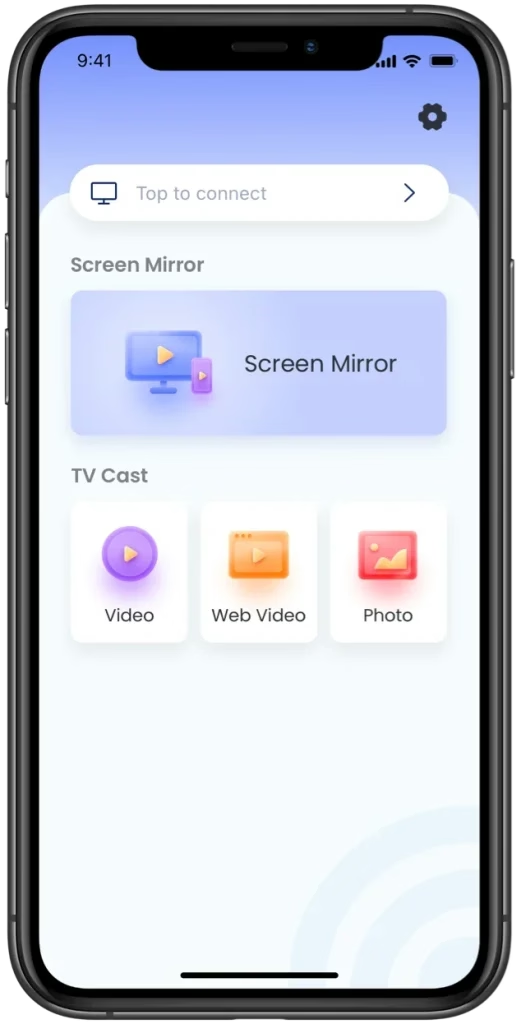
With the app, my Android and iOS device screens were easily duplicated to the TV screen, and the streaming process went smoothly. As I know, the app supports multiple televisions, including Roku TV, Fire TV, LG TV, Samsung TV, and more. That's why I recommend this app.


If you want to give the app a try, please follow Guide to Screen Mirroring TV Cast App that walks you through the setup and connection process.
When some delay is unavoidable
To have a smooth screen mirroring process without lags, make sure you have connected your devices to a stable and robust Wi-Fi network. Up-to-date firmware or software is also crucial.
Hope you have shaken off the performance issue on your TV and have a smooth watching experience. If this post helps you, please share it with others.
Why Is My Screen Mirroring Lagging FAQ
Q: Can I stream my phone to my TV without WiFi?
Without WiFi, you can stream your phone to your TV via a hardwire connection. For example, prepare an HDMI cable and a USB-C to HDMI adapter, then plug the USB-C end into your phone, and connect the HDMI cable between the adapter and your TV. After that, what on the phone will automatically appear on the TV.

 Mar 23, 2026