
I'm sorry to hear that your Fire Stick remote not working with new batteries. While it's always smart to check and change batteries regularly, the issue isn't always with the batteries themselves. Luckily, this blog will walk you through these effective troubleshooting steps.
Way 1. Do Some Basic Checks
When your Fire TV remote not working with new batteries, you can do some basic checks before conducting further restorations.
Way 2. Restart Your FireStick Device
After conducting those basic checks, is the problem FiresStick remote not working after changing batteries solved? If the answer is no, try to restart your Amazon streaming device that can restore some software bugs and minor glitches making your FireStick can't be controlled.
To restart your Fire TV, unplug your Fire TV or FireStick from the power source. Waiting a few minutes to connect the switch again. Next, try to use your FireStick remote to control your Fire streaming device.
Way 3. Re-pair Fire TV Remote
Another quick method to troubleshooting the FireStick remote not working after changing batteries is to unpair the FireStick remote and reconnect it. If batteries aren't the culprit, maybe your remote's connection to the FireStick also needs a refresh.
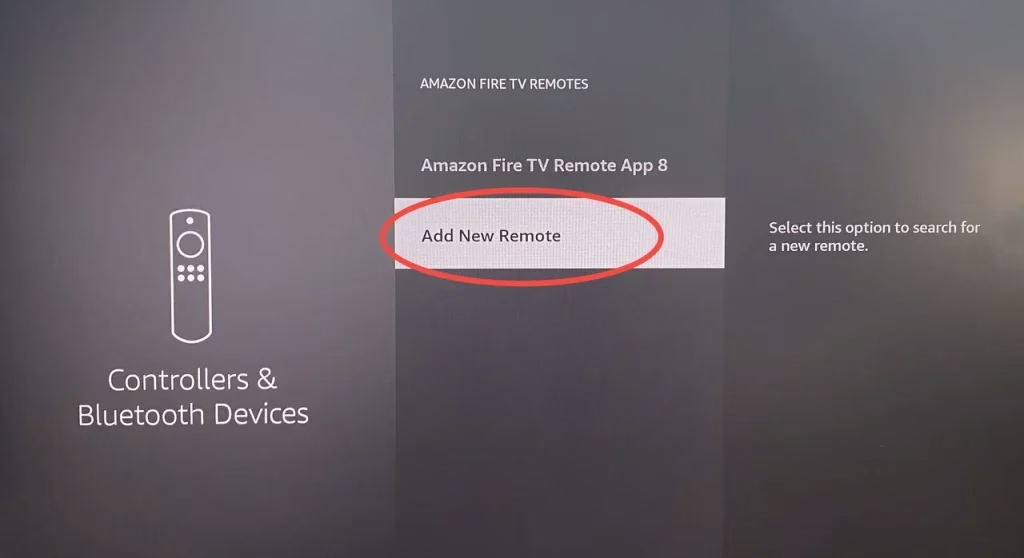
To unpair the paired remote, you can't use the remote itself. It means you need to pair another remote to unpair the not working FireStick remote. Use the second paired remote or skip to way 5 to connect a Fire TV remote app and navigate to the Settings > Controllers & Bluetooth Devices > Amazon Fire TV Remotes.
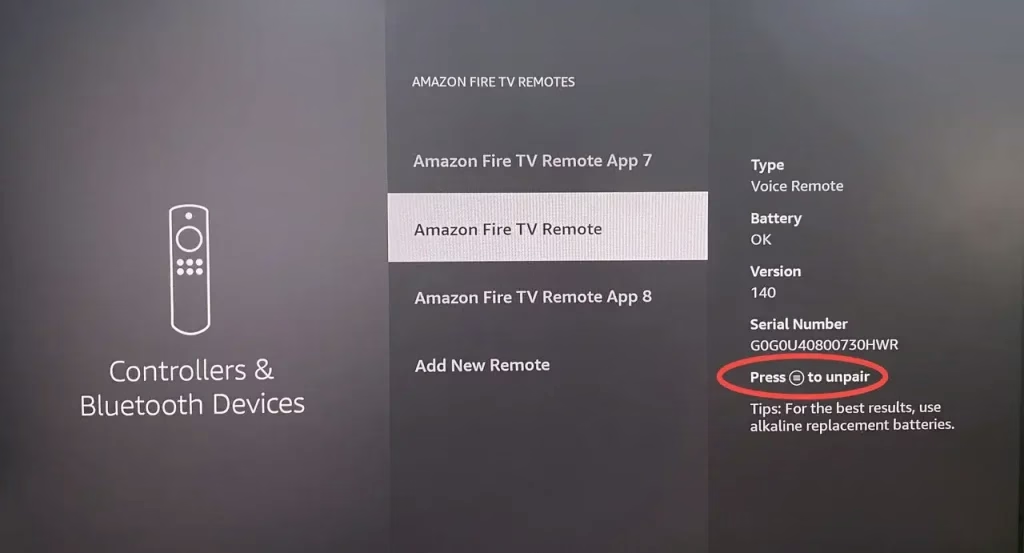
Choose the dysfunctional remote, press the Menu button (three-line icon) and then press the Select button to unpair the irresponsible remote. Finally, press the Home button on your unpaired remote for 10-20 seconds to pair the FireStick remote to Fire TV again.
Way 4. Reset Your FireStick Remote
Once your remote is paired successfully but still can't work, you are allowed to reset the Fire TV remote to restart the internal software and hardware of the remote. For most FireStick remote, the resetting processes are:
Step 1. Unplug your Fire TV from the power supply and HDMI input, then wait 60 seconds.
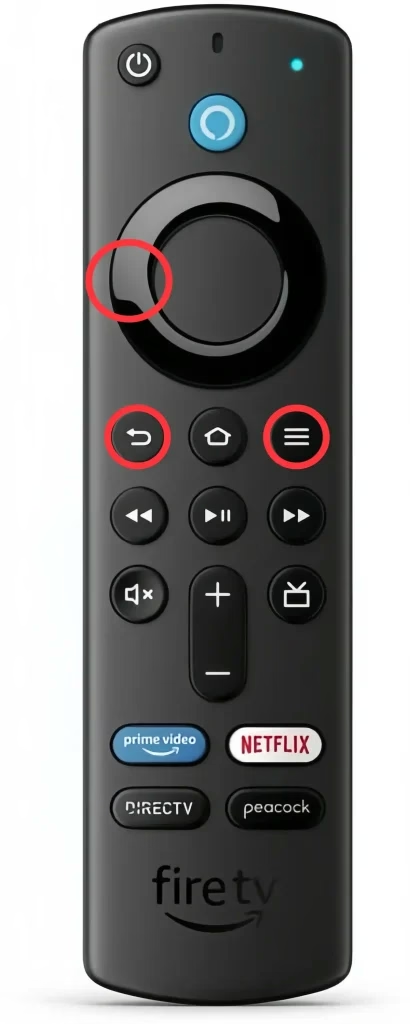
Step 2. Press the Left, Menu, and Back buttons on your remote simultaneously for 12 seconds. Then release the buttons and wait 15 seconds and remove the batteries from your remote.
Step 3. Plug in your Fire TV and wait until the screen says that the remote can't be detected.
Step 4. Put the batteries back in your remote properly and press the Home buttons to reconnect the remote to your streaming device.
Note: When the LED indicator blinks blue, your remote is paired successfully. Otherwise, press the Home button for 10 seconds again.
Way 5. Use a Fire TV Remote App
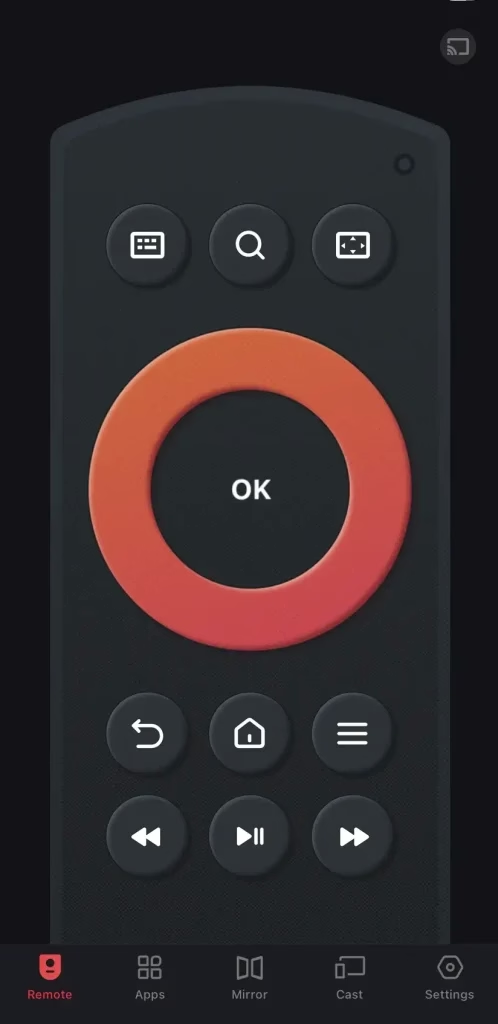
Alternatively, you can handle a free Fire TV remote app to deal with your Amazon remote not working with new batteries. This virtual remote from BoostVision can also help you add a new remote to reconnect the unpaired remote. Here's the operating step:


Step 1. Install the Fire TV remote app on your mobile device.
Step 2. Ensure your Fire TV and the mobile device are connected to the same Wi-Fi network.
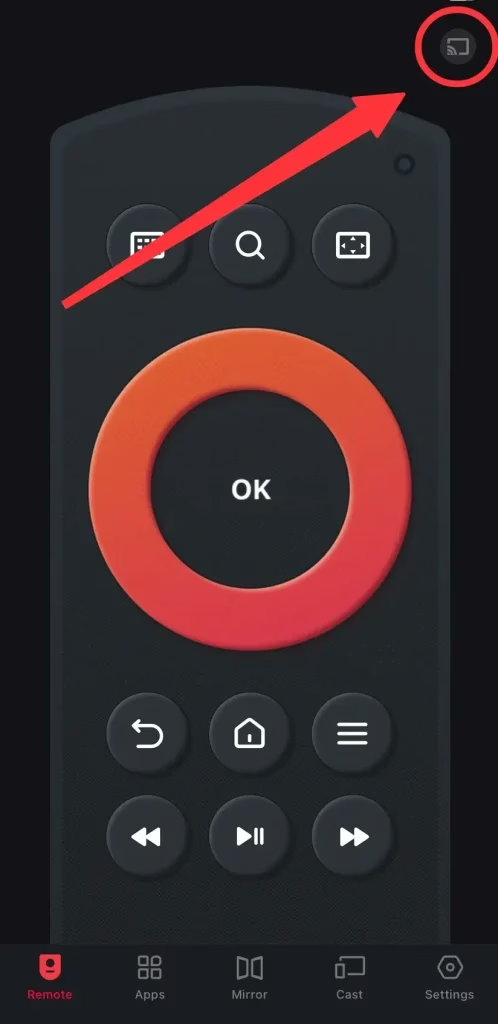
Step 3. Launch the app on your smartphone or tablet and allow its permission. Tap the upper right corner to choose your Amazon streaming device to pair.
Step 4. When the virtual remote is paired successfully, you can control the paired FireStick to stream wonderful content.
Note: If you want to connect the unpaired physical remote, tap the onscreen buttons to reach the Settings > Controllers & Bluetooth Devices > Amazon Fire TV Remotes > Add New Remote. Then press and hold the Home button for 10 seconds to wait for your Fire TV to find the remote and press Select button on the virtual remote.
Way 6. Try Vinegar Clean
If the Amazon FireStick remote not working with new batteries still persists, there is a critically acclaimed recommendation from Amazon Fire TV forum that you can refer to before contacting the official support.
You can remove the batteries from the remote first, then try rubbing vinegar on the metal pieces inside the battery compartment. Dry then put your batteries back in.
Wrapping Up
Generally speaking, your FireStick remote won't work even with new batteries isn't a bad thing, and it helps you rule out battery issues. Next, you can try restarting your FireStick device, re-pairing the Fire TV remote, resetting your FireStick remote, using a Fire TV remote app and leveraging vinegar clean to address this problem.
Fire Stick Remote Not Working with New Batteries FAQ
Q: Why is my Firestick remote not working even with new batteries?
Because the culprit is not the battery. There might be other minor glitches on the remote, or the damaged cables and signal interference cause your remote not working.
Q: How do I fix an unresponsive FireStick remote?
Here are the common solutions:

 Dec 20, 2023