
Universal remote codes for Panasonic TVs are numerical codes programmed into universal remote controls to operate your Panasonic television. These codes serve as a bridge, allowing the remote to communicate with the TV. They are essential when setting up a universal remote to replace or supplement the original Panasonic remote control.
List of Universal Remote Codes
It is very hard to list all codes for Panasonic TV because different universal remote uses different codes, but we can list codes for several popular universal remotes, including the codes to program Panasonic universal remote.
| Name | Code | |
|---|---|---|
| Panasonic universal remote codes | 1231, 1289, 1049, 1053, 1292, 1295, 1010, 1123, 1003, 1152, 1096 | |
| Panasonic HDTV universal remote codes | 1169, 1410, 1140, 1336, 1170, 1234, 1331, 1442, 1417, 1233, 1194 | |
| Panasonic DVD universal remote codes | 2031, 2066, 2075, 2076, 2104, 2105, 2106, 2111, 2151, 2153, 2154 | |
| Panasonic audio universal remote codes | 4030, 4063, 4050, 4018, 4038, 4051, 4005 | 1277, 1275, 1406, 1055, 1418, 1253, 1109, 1392, 1130, 1003, 1054, 1289, 1246, 1419, 1170, 1389, 1286, 1350, 1062 |
| [GE remote codes](https://www.boostvision.tv/blog/how-to-program-a-ge-universal-remote) for Panasonic | 0437, 0054, 0170, 0950, 0003, 0070, 0171. 0062, 0381, 0148, 0374 | |
| [Philips remote codes](https://www.boostvision.tv/blog/philips-universal-remote-code) for Panasonic | 0039, 0696, 0416, 0618, 0739, 0901, 0608, 0345, 0007, 0807, 0718 | |
| [Magnavox remote codes](https://www.boostvision.tv/blog/magnavox-universal-remote-codes) for Panasonic | 0029, 0052, 00064 | |
| [Spectrum remote codes](https://www.boostvision.tv/blog/spectrum-remote-tv-codes) for Panasonic | 3, 080, 034, 056, 164, 208, 359, 552, 524, 607, 664, 0250, 0051, 10250, 11480, 11457, 10051, 10650, 11271, 11291, 11410, 11941, 11946 |
How to Program Universal Remote to Panasonic TV with Codes?
With Panasonic remote codes provided above, you can follow the instructions below to get it programmed.
Step 1. Press the Setup button.
Step 2. Press the TV button. If you want to control other devices like a DVD, press the related button.
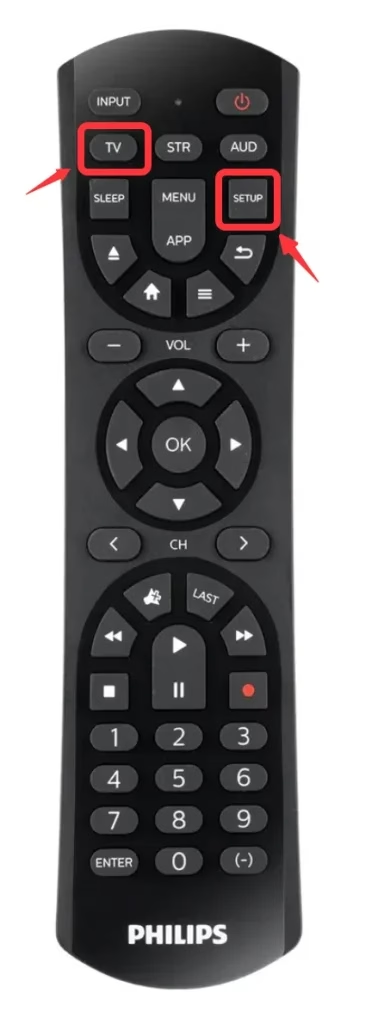
Step 3. Enter the code for Panasonic TV.
Step 4. Turn off the TV by pressing the Power button.
Step 5. Turn the TV on to check if all the buttons work. If some button doesn't work, you need to repeat the procedure and try another code.
How to Control Panasonic TV without Universal Remote?
Panasonic universal remote programming takes a lot of effort, because you need to search for the right code and try them one by one. You might wonder, how to program a Panasonic universal remote without codes? One better solution is using your smart phone as a remote to control your Panasonic TV.
Introducing the Universal TV Remote app by BoostVision technology, with this app you can easily control your Panasonic TV without any programming.


Step 1. Ensure your smart phone has an infrared laser sender.
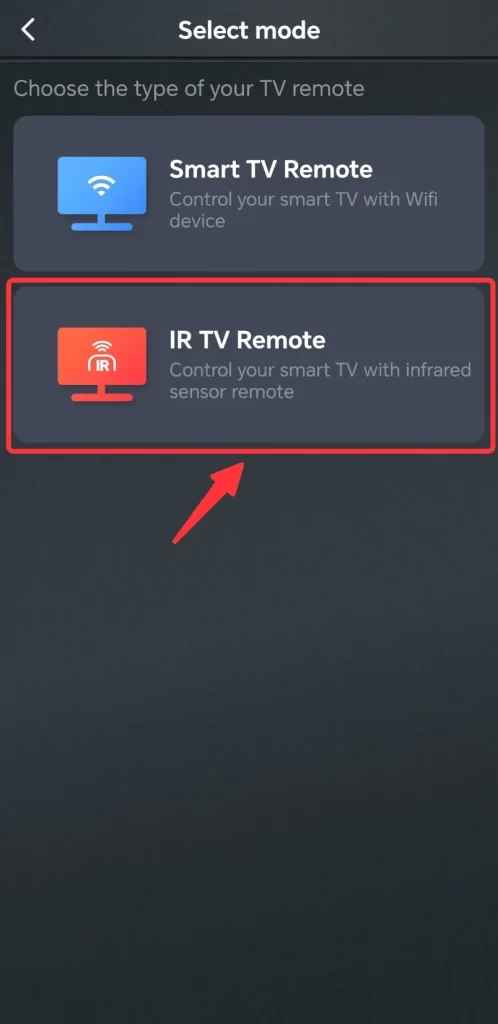
Step 2. Open the app, tap the Add button, and select IR TV Remote.
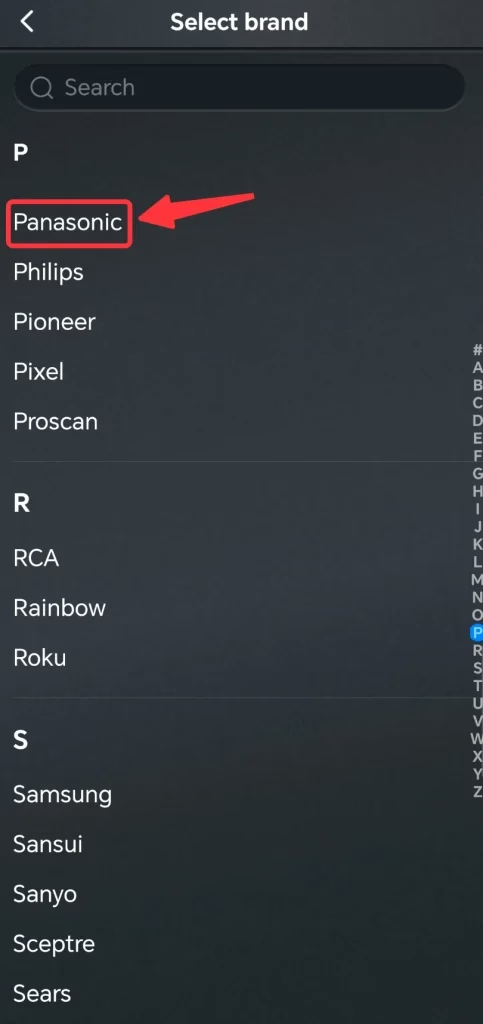
Step 3. Select the brand of your TV, and here we will select Panasonic.
Then, you will be able to control your Panasonic TV with your smart phone.
Conclusion
With universal remote codes for Panasonic TV above, you will be able to get your universal remote programmed to control your Panasonic TV. By entering the correct code and following the setup steps, you can access all key functions and enjoy a streamlined, hassle-free viewing experience. Also, using your smart phone as a remote is another great idea, because it is simpler, smarter, and more convenient.
Universal Remote Codes for Panasonic TV FAQ
Q: How do I program my universal remote to my Panasonic TV?
You can program your universal remote to Panasonic TV with the procedure below:
Q: How to find Panasonic TV remote code?
The remote code for Panasonic TV will be different with different models of universal remote. In order to find the universal remote code, you need to read the manual of your universal remote.
Q: What is the 4-digit code for a Panasonic TV?
Common codes: 0250, 0051, 0226, 0650, 1480 (varies by remote model).
How do I connect my remote to my TV without a code?
Use auto code search: hold the TV button → press Power repeatedly until the TV turns off → press Enter/# to save.
Q: How do I find my Panasonic TV model number?
Check the sticker on the back of the TV, the original box/manual, or Settings → System/About on the TV menu.
Q: Will any universal remote work on a smart TV?
Most will control basic functions (power, volume, input), but smart features/apps may not work.
Q: How do I know which remote is compatible with my TV?
Check the TV brand/model and confirm the remote supports that brand in its compatibility list.
Q: What do I do if I lost my TV remote?
Use a universal remote, a mobile remote app, or buy the original replacement remote.
Q: Can a TV be too old for a universal remote?
Usually no—most old TVs use standard IR signals, which universal remotes support.