
What's the 4 digit code for Samsung TV? It can be either the Samsung TV PIN code or the Samsung TV universal remote control code. Both are completely different in terms of function and usage, and this post will discuss the differences between them.
4-digit Samsung TV PIN Code
On the one hand, the four digit code for Samsung TV could be Samsung TV PIN code. A PIN (Personal Identification Number) code is a four-digit password to access various TV features, including app installations and personal controls. Therefore, with this 4 digit code for Samsung TV, only your authorized individuals can make changes to your Samsung TV settings and you can maintain your privacy.
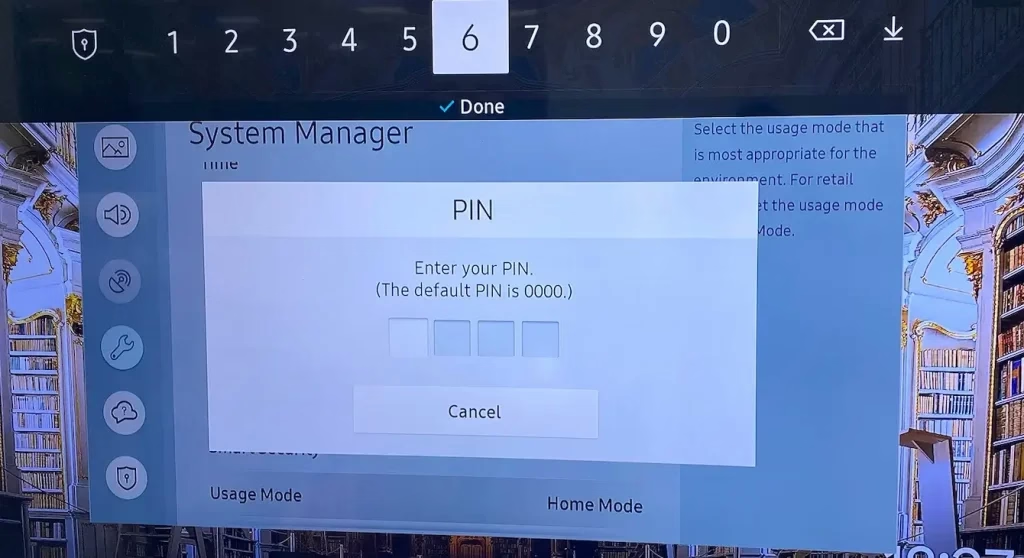
The default Samsung TV PIN code is set to 0000, but you have the option to change or reset it if forgotten.
How to Change Samsung TV PIN Code
Changing the default PIN code is straightforward, and after this, you will be asked to enter your new PIN code if you try resetting your Samsung TV or making other changes.
Tip: How to change or enter this 4 digit code for Samsung TV without remote? You can apply Samsung TV Remote, a mobile software released by BoostVision, to get rid of the remoteless dilemma.
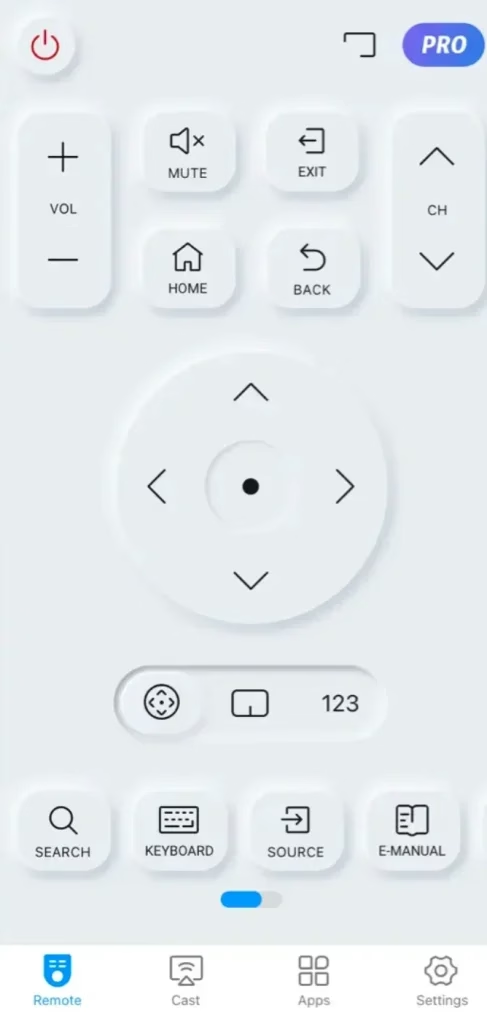


Step 1. Press the Home button on the remote control and go to Settings.
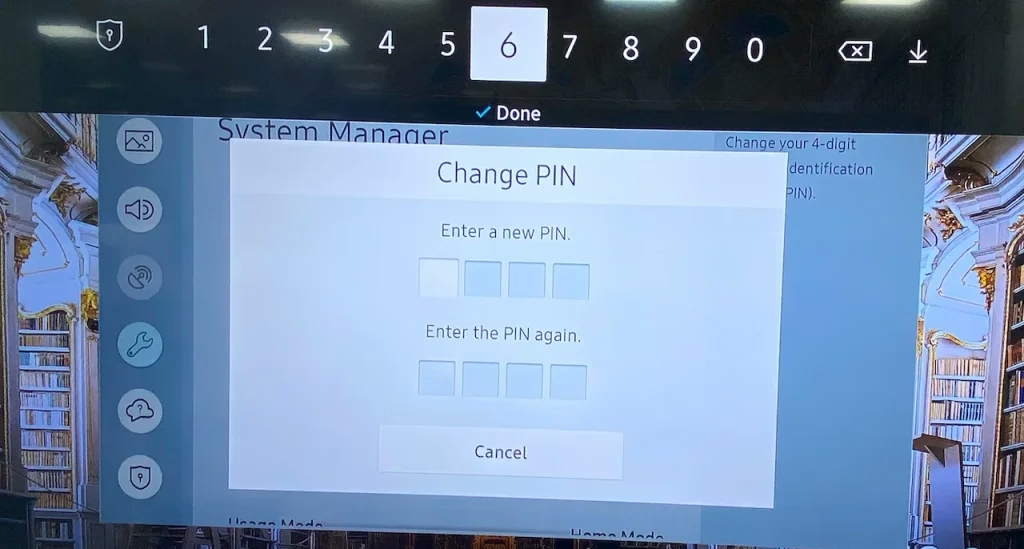
Step 2. On the Settings menu, navigate to General > System Manager > Change PIN.
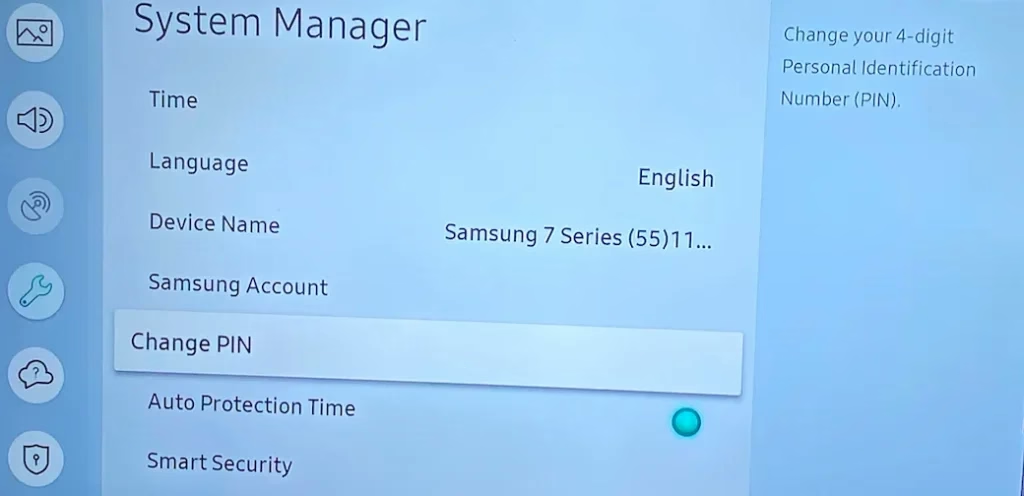
Step 3. Enter the default Samsung TV PIN code (0000).
Step 4. Enter a new PIN code and enter it again.
How to Reset Samsung TV PIN Code
If you forget your PIN code, you can reset it to 0000, and assign a new PIN code with steps above.
Reset a Samsung TV PIN code with a Samsung Smart Remote:
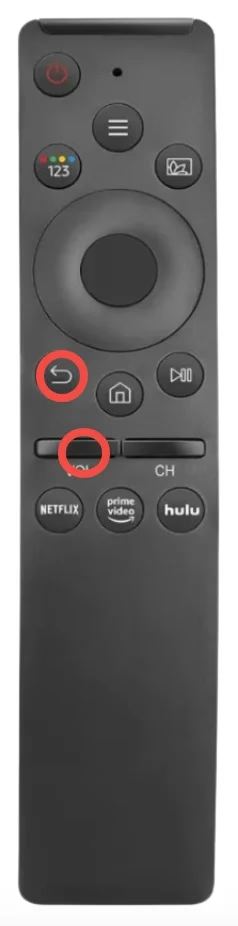
Step 1. Turn on your Samsung TV, then press the Volume button on the remote.
Step 2. Flick the Volume button up to increase the volume, then press the Return button.
Step 3. Flick the Volume button down to decrease the volume, then press the Return button.
Step 4. Flick the Volume button up again, then press the Return button, and the PIN should be reset to 0000.
Reset a Samsung TV PIN code with a Samsung Standard Remote:
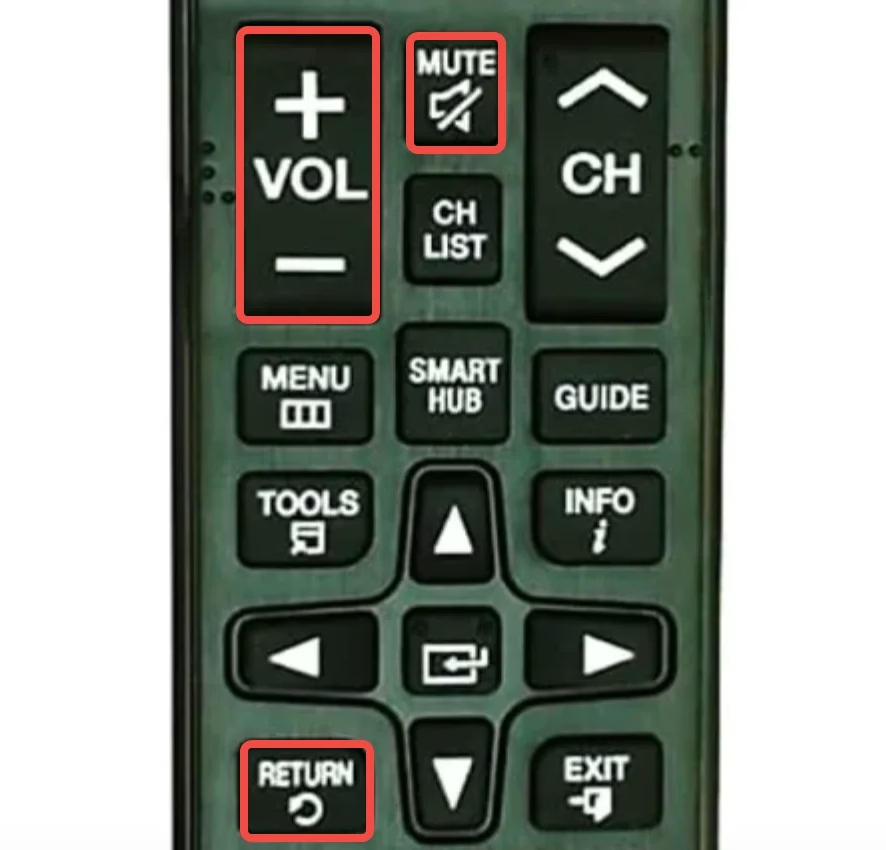
Step 1. Turn on your Samsung TV, then press the Mute button on the remote.
Step 2. Press the + (Volume Up) button, then press the Return button.
Step 3. Press the - (Volume Down) button, then press the Return button.
Step 4. Press the + button again, then press the Return button, and the PIN code should be reset to 0000.
4-digit Samsung TV Remote Code
On the other hand, the four digit code for Samsung TV usually refers to Samsung TV remote code. It is used to program a universal remote to Samsung TV, allowing seamless operation of functions such as power, volume, and channel selection.
There are many 4 digit codes for Samsung TV universal remotes, and they are:
0002, 0004, 0005, 0007, 0009, 0012, 0015, 0019, 0030, 0037, 0056, 0060, 0076, 0077, 0080, 0085, 0093, 0102, 0103, 0104, 0105, 1016, 0109, 0110, 0112, 0172, 0178, 0208, 0209, 0212, 0226, 0264, 0302, 0309, 0358, 0370, 0437, 0502, 0512, 0556, 0587, 0609, 0618, 0644, 0802, 0812, 0818, 0895, 0942, 1004, 1009, 1012, 1013,n1014,n1015,n1019, 1025, 1046, 1056, 1065, 1069, 1078, 1083, 1102, 1103, 1104, 1123, 1124, 1171, 1172, 1173, 1174, 1175, 1194, 1197, 1198, 1200, 1205, 1207, 1235, 1245, 1246, 1249, 1312, 1325, 1327, 1352, 1354, 1443, 1458, 1506, 1584, 1619, 1630, 1744, 2051, 2103, 2137, 3131
In addition, there are 2-, 3- and 5-digit codes for Samsung TV universal remotes:
5 digit code for Samsung TV: 10030, 10032, 10054, 10056, 10060, 10178, 10217, 10329, 10408, 10427, 10482, 10587, 10650, 10702, 10766, 10812, 10814, 11060, 11575, 11632, 11959, 12051, 13993
2 digit code for Samsung TV: 03, 04, 11, 12, 13, 19, 23, 26, 70, 72
3 digit code for Samsung TV: 004, 005, 009, 015, 104, 105, 106, 109, 140, 172, 265, 505, 506, 507, 516, 520, 523, 526, 564, 573, 601, 611, 627, 647, 652, 654, 655, 667, 680, 696, 738, 794, 833, 858, 989
How to Find Samsung TV Remote Code
If you have a universal remote, refer to its manual or the manufacturer's website for a list of compatible codes for Samsung TVs. BoostVision has collected different digit codes for popular universal remotes for Samsung TV, and from its collection, you may get what you need.
Magnavox universal remote codesOnn universal remote codesSpectrum universal remote codesXifinity universal remote codesHow to Use Samsung TV Remote Code
As mentioned above, Samsung TV remote code is used to set up a seamless connection between a universal remote and Samsung TV. Generally, the connection can be finished with the steps below:
Step 1. Turn on your Samsung TV, then point a universal remote towards the TV.
Step 2. Press the TV button on the universal remote.
Step 3. Press and hold the Setup button on the universal remote until the red LED lights up, then release it.
Step 4. Enter a code for Samsung TV remote. If the code is correct, the LED light will blink twice. If not, repeat the process with another code.
Conclusion
Samsung TV PIN code is a 4-digit combination, and the default PIN is 0000. Thus, a 4 digit code for Samsung TV may be Samsung TV PIN code. Plus, it also may be a 4 digit code for Samsung TV remote that is used to pair a universal remote to Samsung TV, such as 0609, 0618, 0644, 0802, 0812. However, Samsung TV remote code can be 4-digit, as well as 2-digit, 3-digit, and 5-digit.
So, what's the 4 digit code for Samsung TV? You may have your own answer.
4 Digit Code for Samsung TV FAQ
Q: Where is the 4 digit PIN on a Samsung TV?
In terms of security, Samsung TV does not display the PIN code on any screen. If you forget your PIN code, you can reset it to the default one (0000) and create a new one. To reset a Samsung TV PIN code, you need to press a few buttons on the remote while the TV is on: Volume > Volume + > Return > Volume - > Return > Volume + > Return (on the Samsung Smart Remote) or Mute > Volume + > Return > Volume - > Return > Volume + > Return (on the Samsung Standard Remote).
Q: What is the factory reset code for Samsung?
The factory reset code for Samsung TV is the PIN code, and the default PIN code is 0000. If you have ever changed it to another one, you need to enter that one, then your Samsung TV will start factory resetting itself.
Q: How do I find my Samsung remote code?
Refer to its manual or the manufacturer's website for a list of compatible codes for Samsung TVs. Once you find it, you can follow the manual to set up the connection between your universal remote and Samsung TV by entering the correct code. If you can't find a Samsung TV remote code, you can try setting up the connection without a code as some universal remote support a built-in code search function.
 Mar 23, 2026