

 English
 Portuguese
 Spanish
 French
 German
 Japanese
 オーリック・セリーヌ
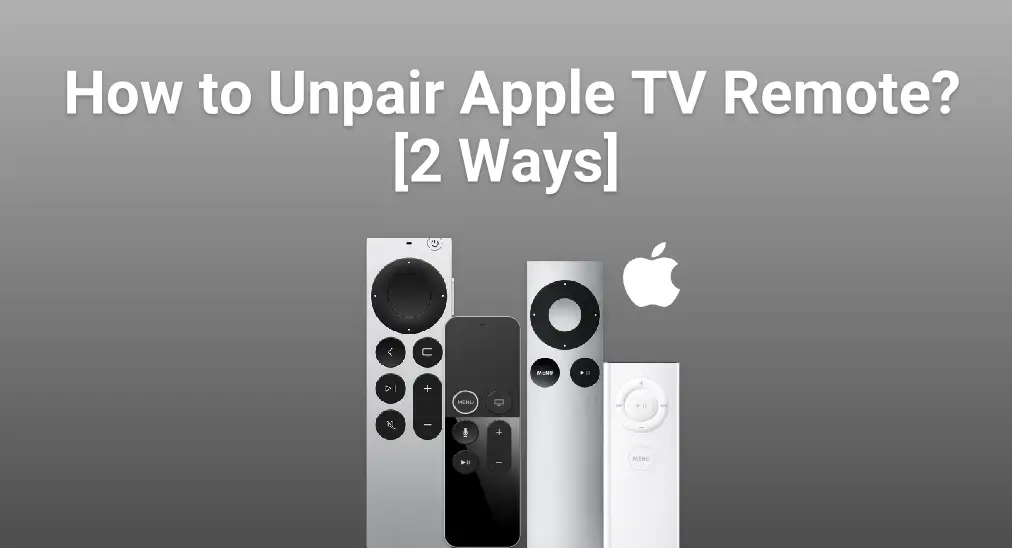
デバイスを切り替えたり、接続の問題を修正したり、干渉を避けたりする場合は、Apple TVリモコンのペアリング解除が必要になることがあります。ペアリング解除により、Apple TVが正しいリモコンだけに反応するようになります。このガイドでは、スムーズで途切れのない操作のために、どのApple TVリモコンでもペアリング解除する方法を説明します。
目次
Appleリモコンの切断方法
Disconnecting your Apple TV remote from your device is easier than you might think. In fact, there are two straightforward methods to do this, each designed to get the job done quickly and smoothly. Let's dive in and get your remote unpaired in no time!
方法1.設定からAppleリモコンのペアリング解除
Appleリモコンのペアリングを解除するには?簡単な方法は、Apple TVの設定から行うことです。設定を開いて、以下の手順に従い、リモコンを迅速かつ手間なく切断してください。
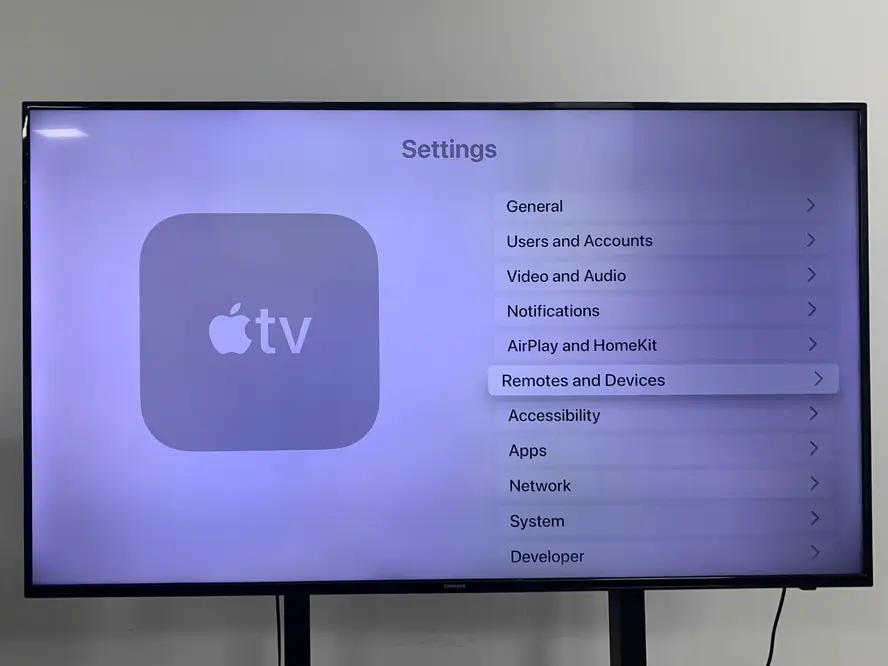
ステップ1. オープン 設定 スクロールダウンして選択してください。 リモコンとデバイス.

ステップ2. 選ぶ リモコンアプリとデバイス 他のデバイスから、削除したいデバイスをクリックしてください。

ステップ3. タップしてください。 デバイスを忘れる Apple TVから応答するリモコンアプリのペアリングを解除するオプション。
方法2.リモコンのボタンを使ってAppleリモコンのペアリング解除
The second way to solve how to disconnect Apple TV remote is also simple to complete. It involves pressing a specific combination of buttons on the Apple remote itself to unpair it quickly—no menus or settings needed.

もし画像上のオリジナルApple TVリモコンのペアリングを解除したい場合は、ただボタンを押すだけです。 MENU そして Left 数秒間リモコンのボタンを押し続けます。
If you want to unpair Siri remote or Apple TV Remote, it's a pity that these remotes have no unpair option. But you can try disconnecting it from your Apple TV by the Apple TVのリモコンアプリをリセットするプロセス.
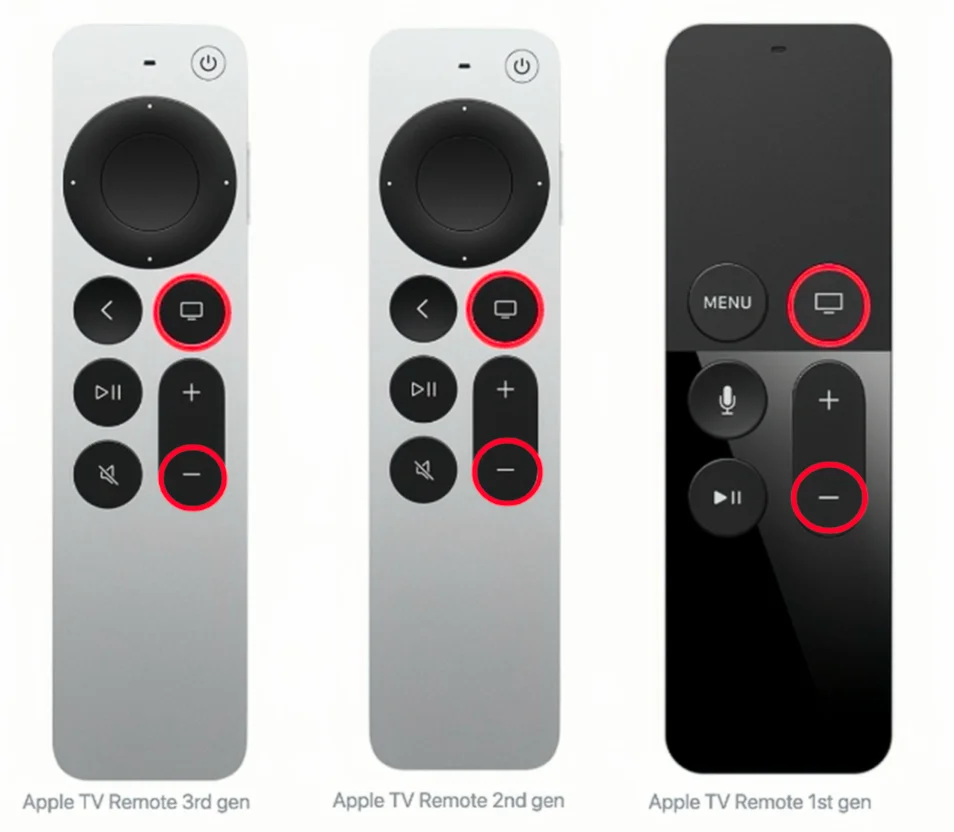
ステップ1. 押してください テレビ アイコンと 音量を下げる ( - アップルTVのリモコンまたはSiriリモコンのアイコンボタンを数秒間同時に押し続けます。
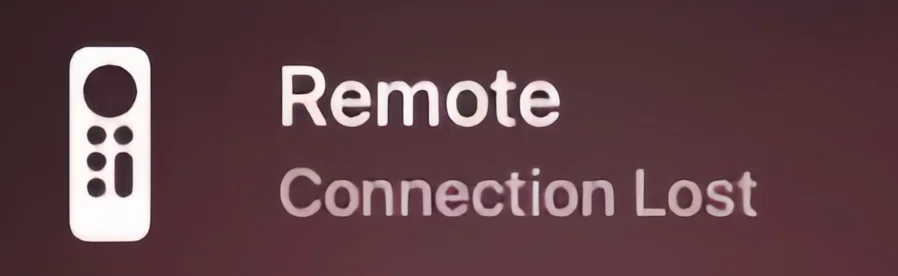
ステップ2. ボタンを離すまで待ち、テレビ画面に「接続が失われました」という通知が表示されるのを確認してください。
ステップ3. その他のリモコンアプリを使用して、ペア解除したいリモコンアプリではなく、Apple TVに接続するために近づくことができます。
After learning these two methods to unpair Apple TV remote 4K, do you relieve your vexation? In the next part, I will introduce two virtual remotes to you, and the two smart remotes will be upgraded online. It means you don't need to re-purchase the new one just like the physical remote, which costs you money for every version.
代替案:Apple TVリモコンアプリを使う
もしあなたの Apple TV remote isn't working, you have two virtual alternatives to keep things running smoothly. The first is the built-in Apple TV Remote in the Control Center on your iPhone or iPad. The second is a free universal Apple TV remote app available on both iOS and Android devices.
コントロールセンターでApple TVリモコンを使う
この機能はiPhoneやiPadのコントロールセンターにあり、画面の右上隅から下にスワイプするか、画面の下端から上にスワイプして表示できます。

この機能は、iPhoneやiPadのコントロールセンターにあります。iPhoneまたはiPadの画面の右上から下にスワイプするか、下部のラインから上にスワイプすることで表示されます。それ以外の場合は、追加を待っています。 設定 > コントロールセンター > もっとコントロール 緑のボタンをタップしてください。 + リモコンアプリのアイコンの前のボタン。

ステップ1. リモコンアプリのアイコンボタンをタップして、このApple TVのリモコンアプリ機能を実行します。その後、上部をクリックしてください。 テレビを選ぶ Apple TVを選択して、4桁のパスコードで接続します。
ステップ2. ペアリングプロセスの後で、あなたは iPhoneをApple TVのリモコンアプリとして使用します。。そのアップグレードのためには、iPhoneまたはiPadでiOSバージョンアップグレードの通知を待つだけです。
無料のユニバーサルApple TVリモコンアプリを使う
The virtual Apple TV remote works on both iOS and Android devices, giving you a convenient alternative to the physical remote. You can easily update it by tapping the upgrade button in the App Store or Google Play—no need to worry about battery life or hardware updates like with a physical remote.

このアプリは、携帯電話とテレビの間の操作をより便利にすることを目指すプロのソフトウェア開発会社BoostVisionによって開発されました。複雑な接続手順なしで、世代を問わずApple TVをリモコンアプリで操作できます。
万能リモコンアプリをダウンロードします


ユニバーサルアップルTVリモコンアプリの使用方法:
ステップ1. BoostVisionのユニバーソルアップルTVリモコンアプリをアプリストアからAndroidデバイスにダウンロードしてインストールしてください。

ステップ2. デバイスがApple TVと同じ無線ネットワークに接続されていることを確認してください。次に、テレビ画面に表示されたPINコードを使用してApple TVとペアリングするために、それを開いて上部をタップします。
ステップ3. ペアリング処理の後、このアプリをあなたのAndroidのスマホで使用して、Apple TVを制御できます。
結論
Apple TVリモコンの切断方法は?設定からApple TVリモコンのペアリングを解除するか、リモコンの対応するボタンを押すことができます。さらに、このブログでは、Appleリモコンが動作しない場合の代替として、2つの強力なバーチャルApple TVリモコンも紹介しています。
Apple TVリモコンのFAQ
Q: Apple TVからリモコンアプリを削除する方法は?
- 行ってください 設定 Apple TVのリモコンアプリのボタンを押して選択してください。 リモコンとデバイス.
- 選ぶ リモコンアプリとデバイス 他のデバイスからデバイスを選択し、削除したいデバイスをクリックしてください。最後に選択します。 デバイスを忘れる アクションを確認するために。
Q: Apple TVのリモコンアプリをリセットするにはどうすればよいですか?
- 押し続けて テレビ/コントロールセンター ボタンとその ボリュームダウン 同時にボタンを押します。
- ボタンを離します。数秒間待ってください。 接続が失われました。 テレビ画面に通知が表示されます。
- リモコンアプリが再起動するのをお待ちください。 接続済み 通知が表示されたら、リモコンアプリを使用できます。
オーリック・セリーヌ
オーリック・セリーヌはBoostVisionのウェブコンテンツライターで、スマートデバイスに興味があり、視覚体験に注目しています。彼女は、他の人々がストリーミングメディアのトレンドに参加し、彼女と同様に素晴らしい視覚体験を得られるよう、専門的な情報を提供することを目指しています。