
ユニバーサルリモコンコードを使うと、ユニバーサルリモコンをテレビ、ストリーミング機器、DVDプレーヤー、サウンドバーに接続できます。正しいコードを入力すれば、リモコンが機器と同じ信号方式で通信し、電源、音量、入力切替などを再び操作できます。
本ガイドでは、Samsung、LG、Sony、TCL、Vizio、Roku、Philipsなど主要テレビブランドのコードをまとめています。リモコンの設定手順、実践的なトラブル対処法、コードが使えない場合の代替操作方法も紹介します。
目的はシンプルです。でたらめな番号を何時間も試さず、リモコンを再び使えるようにすることです。
ユニバーサルリモコンコードとは
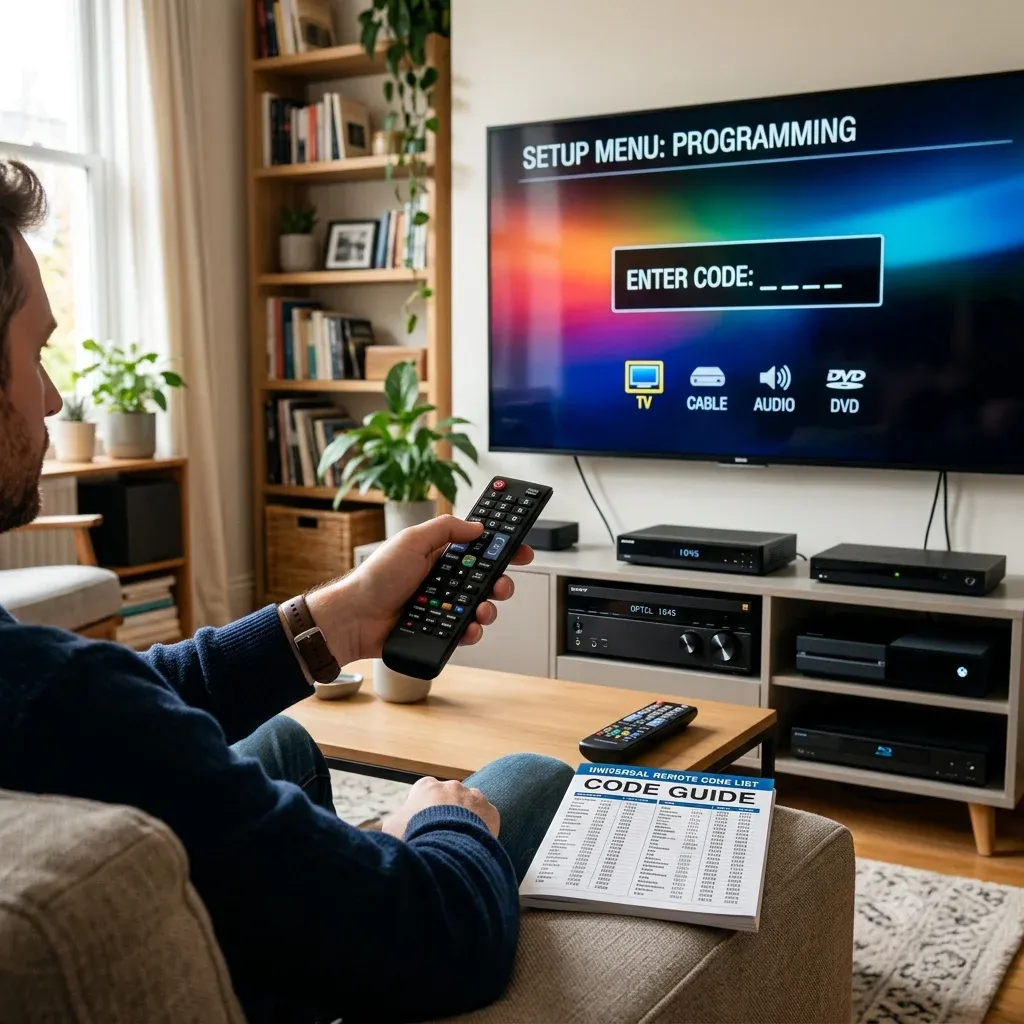
ユニバーサルリモコンコードとは、リモコンと機器をペアリングするための短い数字列です。リモコンとテレビの間を取り持つ翻訳者のような役割を果たします。
メーカーごとに信号パターンが異なり、コードは送信すべきパターンをリモコンに指示します。一般に次の3形式があります。
| コード形式 | 例 | 主な用途 |
|---|---|---|
| 3桁コード | 081 | 旧型リモコン |
| 4桁コード | 0178 | 最も一般的 |
| 5桁コード | 11756 | 新しいユニバーサルリモコン |
テレビによっては複数のコードに反応します。最初のコードが失敗しても非対応とは限らないため、一覧の次のコードを試してください。
実際、最初の1回で諦めることが、ペアリング失敗の大きな原因になっています。
コード一覧を見る前に、手元のリモコンが何桁の入力を求めるか確認してください。4桁だけを受け付ける機種も、5桁を求める機種もあります。正しい番号でも桁数が違えば失敗します。テレビが無視しているのではなく、形式が違うのです。
まずは電源、音量、入力をテストしてください。この3つが動けば設定は完了です。チャンネルキーやメニューキーはモデルによって動作が不安定でも、テレビを実用的に操作するには完全一致でなくても構いません。
テレビブランド別ユニバーサルリモコンコード一覧
以下では、画面の前でテレビのブランドを確認してすぐ探せるよう、コードをテレビブランド優先で分類しています。ブランドを選び、リモコンが求める桁数に合わせてください。
推奨する手順は次のとおりです。
1. リモコンに合う最短の一覧から始めます。 4桁対応なら、5桁へ進む前に4桁コードを試します。
2. テストするのは3ボタンだけです。 電源、音量、入力が動けば完了です。本当に必要でなければ、メニュー操作の完全一致を追い続ける必要はありません。
3. 電源は動くのに 入力 が動かない場合は、もう一巡します。 電源だけを扱う基本コードも多く、次のコードで入力切替や全操作が使えることがあります。
簡単な確認として、どのコードにも反応しない場合は機器モードが違う可能性があります。DVD、AUX、Cableではなく、リモコンをTVに設定してください。
Hisenseテレビ用ユニバーサルリモコンコード
Hisenseテレビは比較的ペアリングしやすい一方、桁数には敏感です。4桁と5桁の両方に対応するなら、試しやすく多くのリモコンが採用する4桁から始めます。テレビの電源が切れるコードを見つけたら、音量と入力切替も確認してください。入力が動かなければそのコードを控え、もう1つ試します。Hisenseには「ほぼ正しい」コードが複数あることがあります。
すぐ試せる対処法として、電池交換後にHisenseリモコンが動かなくなった場合は、電池を入れ直してPowerを5秒間長押ししてください。単純ですが、半端なペアリング状態が解消することがあります。
3桁ユニバーサルリモコンコード:
| コード | コード | コード | コード | コード |
|---|---|---|---|---|
| 000 | 004 | 005 | 009 | 012 |
| 015 | 017 | 019 | 022 | 027 |
| 040 | 046 | 048 | 050 | 051 |
| 056 | 057 | 080 | 103 | 113 |
| 137 | 150 | 151 | 156 | 204 |
| 227 | 338 | 627 | 678 |
4桁ユニバーサルリモコンコード:
| コード | コード | コード | コード | コード |
|---|---|---|---|---|
| 0001 | 0004 | 0016 | 0069 | 0073 |
| 0077 | 0097 | 0133 | 0178 | 0182 |
| 0216 | 0748 | 1004 | 1016 | 1017 |
| 1078 | 1173 | 1176 | 1237 | 1314 |
| 1660 | 2060 | 2098 | 2183 | 2355 |
| 2463 | 2464 | 2503 | 3382 | 3519 |
| 3537 | 4029 | 4051 | 4127 | 4145 |
| 4398 |
5桁ユニバーサルリモコンコード:
| コード | コード | コード | コード | コード |
|---|---|---|---|---|
| 02081 | 05331 | 02211 | 04671 | 00671 |
| 03671 | 04381 | 04391 | 06161 | 01651 |
| 06171 | 02141 | 05341 | 00001 | 10159 |
| 10748 | 11254 | 11314 | 11403 | 11423 |
| 11463 | 11519 | 11520 | 11585 | 11641 |
| 11660 | 11756 | 11780 | 11895 | 11926 |
| 11963 | 12045 | 12098 | 12183 | 12355 |
| 12419 | 13382 | 13519 | 14398 | 14487 |
| 14618 | 14656 | 14740 | 15156 | 15176 |
| 15185 | 21262 | 24344 | 24525 | 25612 |
| 26146 | 31612 | 34243 | 35254 | 35611 |
| 39011 | 39812 | 42113 | 42224 | 43155 |
| 44211 | 44631 | 59413 | 61514 | 67614 |
| 78115 |
Insigniaテレビ用ユニバーサルリモコンコード
Insigniaテレビは、特に大手OEM製パネルの場合、複数のコードを受け付ける傾向があります。一覧が長くても無作為に試すのではなく、候補リストとして扱ってください。
まず一般的なコード群から始めます。多くのリモコンでは0178がよく一致します。テレビの電源だけ切れて音量が動かなくても前進です。近くの次のコードに替えると、全操作が使えることがあります。
3桁ユニバーサルリモコンコード:
| コード | コード | コード | コード | コード |
|---|---|---|---|---|
| 000 | 004 | 005 | 009 | 012 |
| 015 | 017 | 019 | 022 | 040 |
| 046 | 048 | 050 | 051 | 056 |
| 057 | 080 | 103 | 137 | 150 |
| 151 | 156 | 204 | 227 | 338 |
| 627 | 678 |
4桁ユニバーサルリモコンコード:
| コード | コード | コード | コード | コード |
|---|---|---|---|---|
| 0103 | 0115 | 0116 | 0117 | 0133 |
| 0135 | 0141 | 0167 | 0171 | 0178 |
| 0180 | 0189 | 0198 | 0202 | 0213 |
| 0217 | 0247 | 0323 | 0371 | 0463 |
| 0504 | 0520 | 0581 | 0871 | 0911 |
| 0914 | 0921 | 1000 | 1004 | 1017 |
| 1078 | 1126 | 1147 | 1180 | 1181 |
| 1326 | 1378 | 1407 | 1423 | 1463 |
| 1517 | 1564 | 1641 | 1660 | 1780 |
| 1892 | 1963 | 2002 | 2049 | 2184 |
| 2271 | 2334 | 2416 | 2422 | 2426 |
| 2444 | 2445 | 2463 | 2464 | 2751 |
| 2891 | 3002 | 3227 | 3531 | 3761 |
| 4000 | 4029 | 4131 | 4371 | 4487 |
| 4721 | 4761 | 5051 | 5061 | 5181 |
| 6091 | 6171 | 6181 | 6381 |
5桁ユニバーサルリモコンコード:
| コード | コード | コード | コード | コード |
|---|---|---|---|---|
| 06919 | 07216 | 10171 | 10463 | 11204 |
| 11326 | 11385 | 11423 | 11517 | 11564 |
| 11660 | 11756 | 11780 | 11810 | 11892 |
| 11963 | 12002 | 12049 | 12184 | 12219 |
| 12417 | 12751 | 13227 | 15213 | 28511 |
| 28911 | 31517 | 39512 | 45013 | 49412 |
| 69212 | 69613 | 70017 | 82615 | 89713 |
LGテレビ用ユニバーサルリモコンコード
LGは信号方式が比較的一貫しているため、想像より簡単にペアリングできます。4桁対応ならそこから始め、動作するコードを見つけたらすぐInputを確認してください。LGテレビでは、電源は動くのにHDMIを切り替えられないコードがよくあります。
LGサウンドバーも使う場合は、先にテレビをペアリングし、その後サウンドバーを2台目として設定するのがおすすめです。同時に設定すると混乱しやすくなります。
3桁ユニバーサルリモコンコード:
| コード | コード | コード | コード | コード |
|---|---|---|---|---|
| 004 | 005 | 009 | 012 | 050 |
| 057 | 080 | 151 | 156 | 227 |
| 338 | 678 |
4桁ユニバーサルリモコンコード:
| コード | コード | コード | コード | コード |
|---|---|---|---|---|
| 0000 | 0001 | 0002 | 0003 | 0004 |
| 0009 | 0012 | 0015 | 0017 | 0020 |
| 0030 | 0032 | 0048 | 0056 | 0060 |
| 0067 | 0091 | 0100 | 0101 | 0102 |
| 0104 | 0110 | 0111 | 0117 | 0121 |
| 0131 | 0134 | 0150 | 0151 | 0155 |
| 0156 | 0171 | 0178 | 0184 | 0202 |
| 0217 | 0247 | 0251 | 0307 | 0324 |
| 0338 | 0400 | 0435 | 0463 | 0480 |
| 0502 | 0523 | 0606 | 0609 | 0611 |
| 0761 | 0814 | 0931 | 1004 | 1017 |
| 1018 | 1020 | 1026 | 1037 | 1047 |
| 1082 | 1086 | 1120 | 1126 | 1131 |
| 1181 | 1200 | 1221 | 1224 | 1378 |
| 1393 | 1423 | 1447 | 1471 | 1501 |
| 1911 | 1957 | 2098 | 2254 | 2358 |
| 2424 | 2492 | 2731 | 3001 | 3021 |
| 3091 | 3221 | 3281 | 3311 | 3397 |
| 3398 | 3401 | 3534 | 3571 | 3811 |
| 4079 | 4080 | 4127 | 4213 | 4397 |
| 4398 | 4731 | 5271 | 5501 | 5511 |
5桁ユニバーサルリモコンコード:
| コード | コード | コード | コード | コード |
|---|---|---|---|---|
| 10017 | 10178 | 10856 | 11136 | 11178 |
| 11265 | 11423 | 11447 | 11565 | 12358 |
| 12424 | 12731 | 14261 | 21442 | 23415 |
| 23451 | 24236 | 25145 | 25641 | 31462 |
| 41236 | 42134 | 22436 |
Samsungテレビ用ユニバーサルリモコンコード
Samsungは年式によるモデル差が大きく、コードが「正しい」のに操作感が合わないことがあります。コード一覧を1つずつ使い、入力後に3ボタンを素早くテストしてください。
1. 電源のオン/オフ
2. 音量の上げ下げ
3. 入力またはSourceの切替
電源が動いても入力が動かなければ妥協しないでください。Samsungには近い候補が多数あります。入力が反応するまで続けないと、HDMIを切り替えるときに困ります。
4桁ユニバーサルリモコンコード:
| コード | コード | コード | コード | コード |
|---|---|---|---|---|
| 0000 | 0001 | 0003 | 0007 | 0009 |
| 0012 | 0015 | 0020 | 0030 | 0031 |
| 0032 | 0033 | 0034 | 0038 | 0047 |
| 0048 | 0056 | 0060 | 0067 | 0091 |
| 0095 | 0100 | 0101 | 0102 | 0104 |
| 0106 | 0110 | 0111 | 0121 | 0132 |
| 0150 | 0151 | 0172 | 0178 | 0202 |
| 0247 | 0251 | 0261 | 0331 | 0351 |
| 0463 | 0531 | 0571 | 0650 | 0702 |
| 0711 | 0766 | 0781 | 0812 | 0814 |
| 1026 | 1047 | 1082 | 1120 | 1131 |
| 1191 | 1200 | 1221 | 1311 | 1393 |
| 1501 | 1632 | 1773 | 1911 | 1957 |
| 2051 | 2071 | 2141 | 2355 | 2481 |
| 2482 | 2721 | 2741 | 2961 | 3301 |
| 3321 | 3471 | 3528 | 3561 | 3970 |
| 3993 | 4011 | 4108 | 4111 | 4941 |
| 4961 | 5471 | 5521 | 5791 | 5801 |
5桁ユニバーサルリモコンコード:
| コード | コード | コード | コード | コード |
|---|---|---|---|---|
| 10178 | 10702 | 11060 | 11251 | 11565 |
| 11632 | 12051 | 14241 | 14425 | 14545 |
| 15371 | 15386 | 16616 | 21818 | 24366 |
| 36218 | 38811 | 41655 | 43311 | 66611 |
| 77114 | 79113 | 94818 | 97817 |
Sceptreテレビ用ユニバーサルリモコンコード
Sceptreテレビは設定しやすいものの、内部プラットフォームが複数あります。1つのコードで数個のキーしか動かなくても、非対応という意味ではなく、最適な一致にまだ到達していないだけです。
コード検索機能があっても、Sceptreでは正しいコードが一覧の前半に出やすいため、まず手動コードを試す方が速いでしょう。
3桁ユニバーサルリモコンコード:
| コード | コード | コード | コード | コード |
|---|---|---|---|---|
| 000 | 004 | 005 | 009 | 012 |
| 015 | 017 | 019 | 022 | 027 |
| 040 | 046 | 048 | 050 | 051 |
| 056 | 057 | 080 | 103 | 113 |
| 137 | 150 | 151 | 156 | 204 |
| 227 | 338 | 627 | 678 |
4桁ユニバーサルリモコンコード:
| コード | コード | コード | コード | コード |
|---|---|---|---|---|
| 149 | 171 | 178 | 400 | 480 |
| 516 | 523 | 800 | 1000 | 1004 |
| 1017 | 1018 | 1020 | 1037 | 1071 |
| 1078 | 1086 | 1126 | 1132 | 1147 |
| 1167 | 1224 | 1378 | 1814 | 2337 |
| 2528 | 3521 | 3899 | 4010 | 4022 |
| 4071 | 4075 | 4101 | 4139 | 4886 |
| 5321 |
5桁ユニバーサルリモコンコード:
| コード | コード | コード | コード | コード |
|---|---|---|---|---|
| 11360 | 11599 | 12337 | 12506 | 25564 |
| 26523 | 41126 |
Sanyoテレビ用ユニバーサルリモコンコード
Sanyoは、前面のブランド名だけでは内部の製造元が分からないことがあります。そのためコード一覧が予想より長くなる場合があります。
手順を決めて試しましょう。4桁対応ならそこから始め、電源が動いたら音量と入力も確認します。入力が失敗したら次へ進んでください。Sanyoでは最初に「電源のみ」のコード、次に全機能コードが見つかることがよくあります。
3桁ユニバーサルリモコンコード:
| コード | コード | コード | コード | コード |
|---|---|---|---|---|
| 000 | 004 | 005 | 009 | 012 |
| 015 | 017 | 019 | 022 | 027 |
| 040 | 046 | 048 | 050 | 051 |
| 056 | 057 | 080 | 103 | 113 |
| 137 | 150 | 151 | 156 | 204 |
| 227 | 338 | 627 | 678 |
4桁ユニバーサルリモコンコード:
| コード | コード | コード | コード | コード |
|---|---|---|---|---|
| 0012 | 0048 | 0108 | 0110 | 1142 |
| 0123 | 0171 | 0180 | 3818 | 0400 |
| 0480 | 0523 | 1017 | 1018 | 1020 |
| 1037 | 1086 | 1126 | 1142 | 1147 |
| 1161 | 1181 | 1224 | 1362 | 1378 |
| 1480 | 1647 | 1649 | 1833 | 1834 |
| 1957 | 2000 | 2049 | 2457 | 2458 |
| 2891 | 3488 | 3697 | 3861 | 4033 |
| 4034 | 4145 | 4168 | 4667 | 4740 |
| 5251 | 5261 |
5桁ユニバーサルリモコンコード:
| コード | コード | コード | コード | コード |
|---|---|---|---|---|
| 10054 | 10811 | 11142 | 11480 | 11564 |
| 11655 | 11756 | 12049 | 13488 | 14168 |
| 14740 | 15556 | 16253 | 16443 | 21615 |
| 22312 | 26332 | 31331 | 33311 | 33711 |
| 77715 | 88513 | 98718 | 99014 |
Sharpテレビ用ユニバーサルリモコンコード
Sharpは、テレビのプラットフォーム世代に合うコードなら良好にペアリングできます。一部のコードではテレビの反応が遅くなることがあり、通常は不適切なコードです。
Sharpコードのテストでは、Powerを押して1秒待ちます。反応が遅い、または不安定なら次へ進んでください。良いコードはすぐ反応します。
3桁ユニバーサルリモコンコード:
| コード | コード | コード | コード | コード |
|---|---|---|---|---|
| 000 | 004 | 005 | 009 | 012 |
| 015 | 017 | 019 | 022 | 027 |
| 040 | 046 | 048 | 050 | 051 |
| 056 | 057 | 080 | 103 | 113 |
| 137 | 150 | 151 | 156 | 204 |
| 227 | 338 | 627 | 678 |
4桁ユニバーサルリモコンコード:
| コード | コード | コード | コード | コード |
|---|---|---|---|---|
| 0012 | 0023 | 0053 | 0060 | 0070 |
| 0090 | 0092 | 0095 | 0108 | 0109 |
| 0117 | 0120 | 0125 | 0132 | 0141 |
| 0151 | 0156 | 0159 | 0171 | 0178 |
| 0181 | 0198 | 0211 | 0237 | 0341 |
| 0400 | 0480 | 0523 | 0736 | 0821 |
| 1000 | 1017 | 1018 | 1020 | 1037 |
| 1043 | 1086 | 1121 | 1126 | 1147 |
| 1265 | 1311 | 1369 | 1524 | 1571 |
| 1656 | 1743 | 1801 | 1819 | 1841 |
| 1848 | 1911 | 1957 | 2006 | 2103 |
| 2254 | 2432 | 2435 | 2447 | 2470 |
| 2691 | 2724 | 3024 | 3134 | 3945 |
| 4003 | 4024 | 4146 | 4891 | 4941 |
| 5081 | 5531 |
5桁ユニバーサルリモコンコード:
| コード | コード | コード | コード | コード |
|---|---|---|---|---|
| 08318 | 10156 | 10845 | 11156 | 11256 |
| 11265 | 11356 | 11524 | 11634 | 11656 |
| 11704 | 11945 | 12006 | 12724 | 14885 |
| 15213 | 15556 | 21663 | 22131 | 24543 |
| 31121 | 31331 | 31463 | 33413 | 36411 |
| 36911 | 48512 | 4885 | 57812 | 65014 |
| 67611 | 70017 | 70416 | 72014 | 78614 |
| 90616 | 24919 |
Sonyテレビ用ユニバーサルリモコンコード
Sonyテレビは正しいコードなら安定して動作します。ただしSonyは他機器のコード群にも使われるため、部分的に動いただけで設定完了と誤認しやすい点に注意してください。
「電源が動く」だけで止めず、InputとMenuも確認してください。Sonyでは、ナビゲーションまで正しく動くコードを見つけるためにもう1回試すことがあります。
3桁ユニバーサルリモコンコード:
| コード | コード | コード | コード | コード |
|---|---|---|---|---|
| 004 | 012 | 015 | 019 | 027 |
| 050 | 080 | 113 | 150 | 151 |
| 156 | 204 | 227 | 338 | 627 |
| 678 |
4桁ユニバーサルリモコンコード:
| コード | コード | コード | コード | コード |
|---|---|---|---|---|
| 0000 | 0002 | 0009 | 0030 | 0032 |
| 0033 | 0056 | 0060 | 0071 | 0100 |
| 0101 | 0111 | 0150 | 0151 | 0152 |
| 0171 | 0178 | 0198 | 0237 | 0247 |
| 0400 | 0414 | 0463 | 0480 | 0523 |
| 0639 | 0708 | 0810 | 0816 | 0834 |
| 0902 | 1000 | 1004 | 1010 | 1017 |
| 1018 | 1020 | 1026 | 1030 | 1037 |
| 1043 | 1047 | 1071 | 1082 | 1086 |
| 1120 | 1126 | 1131 | 1147 | 1200 |
| 1224 | 1300 | 1317 | 1393 | 1685 |
| 1901 | 2045 | 2050 | 2056 | 2323 |
| 2438 | 2462 | 2483 | 2741 | 3536 |
| 4007 | 4019 | 4036 | 4151 | 4189 |
| 4448 | 4981 | 5321 | 5811 |
5桁ユニバーサルリモコンコード:
| コード | コード | コード | コード | コード |
|---|---|---|---|---|
| 10000 | 10003 | 10009 | 10015 | 10020 |
| 10030 | 10032 | 10048 | 10056 | 10060 |
| 10067 | 10091 | 10100 | 10101 | 10104 |
| 10110 | 10111 | 10121 | 10150 | 10151 |
| 10178 | 10202 | 10247 | 10463 | 10810 |
| 11004 | 11026 | 11047 | 11082 | 11120 |
| 11131 | 11200 | 11300 | 11393 | 12778 |
| 14189 | 14448 | 14541 | 21115 | 21656 |
| 22556 | 23352 | 26411 | 31912 | 33211 |
| 41112 | 42226 | 44211 | 44411 | 44613 |
| 89616 |
Vizioテレビ用ユニバーサルリモコンコード
Vizioには動作するコードが複数あり、基本的なテレビ機能だけを扱うものと、スマートテレビのナビゲーションまで扱うものがあります。選ぶべきは後者です。
各コードの入力後にInputを2回押してください。入力メニューが開き、左右に移動できれば良い一致です。電源だけ切れて入力が動かなければ続けます。必要でない限り中途半端な一致で妥協しないでください。
3桁ユニバーサルリモコンコード:
| コード | コード | コード | コード | コード |
|---|---|---|---|---|
| 10000 | 10003 | 10009 | 10015 | 10020 |
| 10030 | 10032 | 10048 | 10056 | 10060 |
| 10067 | 10091 | 10100 | 10101 | 10104 |
| 10110 | 10111 | 10121 | 10150 | 10151 |
| 10178 | 10202 | 10247 | 10463 | 10810 |
| 11004 | 11026 | 11047 | 11082 | 11120 |
| 11131 | 11200 | 11300 | 11393 | 12778 |
| 14189 | 14448 | 14541 | 21115 | 21656 |
| 22556 | 23352 | 26411 | 31912 | 33211 |
| 41112 | 42226 | 44211 | 44411 | 44613 |
| 89616 |
4桁ユニバーサルリモコンコード:
| コード | コード | コード | コード | コード |
|---|---|---|---|---|
| 0033 | 0046 | 0081 | 0104 | 0143 |
| 0178 | 0864 | 0885 | 1004 | 1017 |
| 1078 | 1168 | 1169 | 1471 | 1517 |
| 1741 | 1756 | 1758 | 2021 | 2045 |
| 2472 | 2473 | 2474 | 2475 | 2476 |
| 2501 | 2707 | 2757 | 2901 | 3358 |
| 3415 | 3533 | 3651 | 3741 | 3758 |
| 3851 | 4039 | 4071 | 4081 | 4144 |
| 4723 | 4905 | 5561 | 5571 | 5581 |
| 5591 | 5601 | 5611 | 5621 | 5631 |
| 5641 | 5651 | 5661 | 5671 | 5681 |
| 5691 | 5701 | 5711 | 6111 | 6121 |
| 6131 | 6471 | 6511 |
5桁ユニバーサルリモコンコード:
| コード | コード | コード | コード | コード |
|---|---|---|---|---|
| 11758 | 12757 | 13758 | 22563 | 23161 |
| 2512 | 31517 | 31544 |
TCLテレビ用ユニバーサルリモコンコード
TCLテレビは広く普及しており、Roku TV、Google TV、その他のシステムのどれを搭載するかでペアリング方法が大きく変わります。ユニバーサルリモコンは使えますが、複数コードを試す場合があります。
4桁対応ならその一覧から始め、電源が動くコードを見つけたら入力切替と音量を確認します。Roku TVモデルなら、コードが何度も拒否される場合の予備操作としてRokuアプリやRoku用テレビリモコンアプリも利用できます。
3桁ユニバーサルリモコンコード:
| コード | コード | コード | コード | コード |
|---|---|---|---|---|
| 535 | 645 |
4桁ユニバーサルリモコンコード:
| コード | コード | コード | コード | コード |
|---|---|---|---|---|
| 0091 | 0178 | 0514 | 0898 | 1004 |
| 1017 | 1078 | 1421 | 1517 | 1691 |
| 1756 | 1851 | 2011 | 2057 | 2061 |
| 2111 | 2301 | 2414 | 2429 | 2434 |
| 2479 | 2490 | 2493 | 2851 | 3004 |
| 3183 | 3421 | 3426 | 3431 | 3532 |
| 3571 | 3847 | 3879 | 4178 | 4398 |
| 4921 | 5771 | 5961 | 6031 | 6171 |
| 6201 | 6651 | 6918 |
5桁ユニバーサルリモコンコード:
| コード | コード | コード | コード | コード |
|---|---|---|---|---|
| 11756 | 12290 | 12292 | 12434 | 13183 |
| 15165 | 15919 | 22563 | 26245 | 31326 |
| 31434 | 31517 | 33012 | 33146 | 33534 |
| 34621 | 36711 | 37511 | 44211 | 44411 |
| 57011 | 57513 | 61513 | 61514 | 68014 |
| 78913 | 80312 | 80313 | 84416 | 95017 |
Toshibaテレビ用ユニバーサルリモコンコード
Toshibaテレビは多数のコードを受け付けますが、機能範囲は同じではありません。電源と音量は動いても入力切替が動かないコードがあり、ここは見落とせません。
次の順で確認します。
1. テレビの電源を切れるコードを探す
2. 音量操作を確認する
3. 入力切替を確認する
入力が失敗したら次のコードを試してください。Toshibaでは近くにより良い候補があることが一般的です。
3桁ユニバーサルリモコンコード:
| コード | コード | コード | コード | コード |
|---|---|---|---|---|
| 000 | 004 | 005 | 009 | 012 |
| 015 | 017 | 019 | 022 | 027 |
| 040 | 046 | 048 | 050 | 051 |
| 056 | 057 | 080 | 103 | 113 |
| 137 | 150 | 151 | 156 | 204 |
| 227 | 338 | 627 | 678 |
4桁ユニバーサルリモコンコード:
| コード | コード | コード | コード | コード |
|---|---|---|---|---|
| 0012 | 0023 | 0053 | 0060 | 0070 |
| 0090 | 0092 | 0095 | 0108 | 0109 |
| 0117 | 0120 | 0125 | 0132 | 0141 |
| 0151 | 0156 | 0159 | 0171 | 0178 |
| 0181 | 0198 | 0211 | 0237 | 0341 |
| 0400 | 0480 | 0523 | 0736 | 0821 |
| 1000 | 1017 | 1018 | 1020 | 1037 |
| 1043 | 1086 | 1121 | 1126 | 1147 |
| 1265 | 1311 | 1369 | 1524 | 1571 |
| 1656 | 1743 | 1801 | 1819 | 1841 |
| 1848 | 1911 | 1957 | 2006 | 2103 |
| 2254 | 2432 | 2435 | 2447 | 2470 |
| 2691 | 2724 | 3024 | 3134 | 3945 |
| 4003 | 4024 | 4146 | 4891 | 4941 |
| 5081 | 5531 |
5桁ユニバーサルリモコンコード:
| コード | コード | コード | コード | コード |
|---|---|---|---|---|
| 08318 | 10156 | 10845 | 11156 | 11256 |
| 11265 | 11356 | 11524 | 11634 | 11656 |
| 11704 | 11945 | 12006 | 12724 | 14885 |
| 15213 | 15556 | 21663 | 22131 | 24543 |
| 31121 | 31331 | 31463 | 33413 | 36411 |
| 36911 | 48512 | 4885 | 57812 | 65014 |
| 67611 | 70017 | 70416 | 72014 | 78614 |
| 90616 | 24919 |
上記にテレビブランドがなくても心配はいりません。リモコンブランド別にコードを調べ、最も近いテレビプラットフォーム群を使うのが簡単です。小規模ブランドは大手メーカーと同じ赤外線プロファイルを再利用することが多く、別ブランドでもコードを共有できます。
リモコンブランド別ユニバーサルリモコンコード
テレビブランドが分からない場合や、リモコン自身のブランド別コードしか提供されない場合は、このセクションを使います。コードは通常リモコン本体に印字されているブランドごとに整理しています。
このセクションを使う場面:
開始前のベストプラクティス:
何度か試しても反応がなければ、コード一覧を飛ばして後述のコード不要の設定方法へ進みます。この段階では自動検索の方が推測より速いでしょう。
DISHユニバーサルリモコンコード
DISHリモコンは設定しやすく人気ですが、形式には厳密です。多くは3桁または4桁です。電源は動くのに音量が動かなければ、次へ進む前にもう1コード試してください。ブランドごとに近い候補が2つあることがよくあります。
3桁ユニバーサルリモコンコード:
| コード | コード | コード | コード | コード |
|---|---|---|---|---|
| 535 | 645 |
4桁ユニバーサルリモコンコード:
| コード | コード | コード | コード | コード |
|---|---|---|---|---|
| 1756 |
GEユニバーサルリモコンコード
GEリモコンは幅広いテレビコードとコード検索に対応し、シンプルな構成で使いやすい定番です。ただし一覧があるなら手動入力の方が速いのが一般的です。
まず4桁一覧を使ってGEリモコンを設定します。入力後にPowerを1回押し、音量を試します。電源だけ動く場合は次へ進んでください。GEは一致すると明確に動作します。
3桁ユニバーサルリモコンコード:
| コード | コード | コード | コード | コード |
|---|---|---|---|---|
| 535 | 645 | 091 |
4桁ユニバーサルリモコンコード:
| コード | コード | コード | コード | コード |
|---|---|---|---|---|
| 0001 | 0091 | 0101 | 0131 | 0141 |
| 0211 | 0251 | 0261 | 0331 | 0341 |
| 0351 | 0371 | 0531 | 0571 | 0581 |
| 0611 | 0671 | 0711 | 0761 | 0781 |
| 0821 | 0871 | 0921 | 1071 | 1121 |
| 1161 | 1181 | 1191 | 1221 | 1311 |
| 1421 | 1471 | 1501 | 1571 | 1651 |
| 1691 | 1741 | 1801 | 1841 | 1851 |
| 1901 | 1911 | 2011 | 2021 | 2061 |
| 2071 | 2081 | 2111 | 2141 | 2211 |
| 2241 | 2271 | 2301 | 2691 | 2721 |
| 2741 | 2851 | 2891 | 2901 | 2921 |
| 3001 | 3021 | 3091 | 3191 | 3221 |
| 3281 | 3301 | 3311 | 3321 | 3421 |
| 3431 | 3471 | 3521 | 3561 | 3571 |
| 3651 | 3671 | 3741 | 3761 | 3811 |
| 3851 | 4011 | 4071 | 4081 | 4101 |
| 4371 | 4381 | 4391 | 4671 | 4721 |
| 4731 | 4761 | 4891 | 4921 | 4941 |
| 4961 | 4981 | 5051 | 5061 | 5181 |
| 5251 | 5261 | 5271 | 5321 | 5331 |
| 5341 | 5471 | 5501 | 5511 | 5521 |
| 5531 | 5561 | 5571 | 5581 | 5591 |
| 5601 | 5611 | 5621 | 5631 | 5641 |
| 5651 | 5661 | 5671 | 5681 | 5691 |
| 5701 | 5711 | 5771 | 5791 | 5801 |
| 5811 | 5941 | 5961 | 6001 | 6011 |
| 6031 | 6091 | 6111 | 6121 | 6131 |
| 6161 | 6171 | 6181 | 6201 | 6251 |
| 6381 | 6471 | 6511 | 6651 |
LGユニバーサルリモコンコード
LGブランドのユニバーサルリモコン、またはLGをプリセット群として掲載するリモコンでは、このコードが最適な出発点です。LGコードは比較的一貫しているため、すぐ一致が見つかるでしょう。
ペアリング後はHDMI切替を確認してください。不十分な一致はそこで判明します。
3桁ユニバーサルリモコンコード:
| コード | コード | コード | コード | コード |
|---|---|---|---|---|
| 050 | 151 | 338 | 502 | 627 |
| 678 |
4桁ユニバーサルリモコンコード:
| コード | コード | コード | コード | コード |
|---|---|---|---|---|
| 0000 | 0005 | 0009 | 0023 | 0030 |
| 0032 | 0056 | 0060 | 0070 | 0100 |
| 0101 | 0111 | 0150 | 0151 | 0171 |
| 0198 | 0237 | 0247 | 0400 | 0463 |
| 0480 | 0523 | 1000 | 1004 | 1017 |
| 1018 | 1020 | 1026 | 1037 | 1043 |
| 1047 | 1078 | 1082 | 1086 | 1120 |
| 1126 | 1131 | 1147 | 1200 | 1224 |
| 1378 | 1393 | 2045 | 2050 | 2056 |
Magnavoxユニバーサルリモコンコード
Magnavoxは4桁コードを使うことが多く、正しい一致なら良好に動作します。電源が動いた時点で止めず、2~3候補を試すと全機能を扱えるより良いコードが見つかります。
5桁コードは、リモコンが明示的に5桁を求める場合だけ使ってください。
4桁ユニバーサルリモコンコード:
| コード | コード | コード | コード | コード |
|---|---|---|---|---|
| 0002 | 0016 | 0031 | 0032 | 0033 |
| 0034 | 0038 | 0046 | 0047 | 0048 |
| 0053 | 0069 | 0090 | 0092 | 0095 |
| 0097 | 0102 | 0104 | 0107 | 0108 |
| 0115 | 0117 | 0123 | 0125 | 0129 |
| 0132 | 0133 | 0213 | 0217 | 0247 |
| 0307 | 0318 | 0323 | 0324 | 0414 |
| 0435 | 0502 | 0504 | 0514 | 0516 |
| 0520 | 0606 | 0609 | 0639 | 0708 |
| 0801 | 0802 | 0814 | 0816 | 0902 |
| 0911 | 0914 | 1221 | 1416 | 1814 |
5桁ユニバーサルリモコンコード:
| コード | コード | コード | コード | コード |
|---|---|---|---|---|
| 6021 |
One For Allユニバーサルリモコンコード
One For Allは幅広い互換性があり候補も多いですが、すべて試す必要はありません。一覧を順に登るはしごとして扱ってください。
一般的な4桁コードから始め、5桁対応でも4桁が失敗した後に進みます。動作するコードを見つけたら保存して止めます。完全さより、確実な電源と音量操作が実用的です。
3桁ユニバーサルリモコンコード:
| コード | コード | コード | コード | コード |
|---|---|---|---|---|
| 060 | 171 | 702 | 736 | 810 |
| 834 |
4桁ユニバーサルリモコンコード:
| コード | コード | コード | コード | コード |
|---|---|---|---|---|
| 0017 | 0060 | 0171 | 0178 | 0702 |
| 0736 | 0810 | 0812 | 0834 | 1142 |
| 1265 | 1326 | 1362 | 1369 | 1423 |
| 1463 | 1480 | 1517 | 1524 | 1564 |
| 1632 | 1641 | 1647 | 1649 | 1656 |
| 1659 | 1660 | 1660 | 1756 | 1758 |
| 1780 | 1840 | 1860 | 1892 | 1963 |
| 2002 | 2006 | 2049 | 21161 | 21262 |
| 21615 | 2183 | 2184 | 2337 | 2358 |
| 2360 | 2416 | 2424 | 2434 | 2512 |
| 2528 | 25612 | 2707 | 2724 | 2731 |
| 2751 | 3358 | 3394 | 3397 | 3398 |
| 3401 | 3415 | 34243 | 3488 | 3519 |
| 35254 | 3571 | 3758 | 3879 | 3899 |
| 3945 | 3970 | 3993 | 4054 | 4121 |
| 4139 | 4149 | 4151 | 4168 | 4189 |
| 4397 | 4398 | 4448 | 4487 | 4507 |
| 4618 | 4621 | 4667 | 4723 | 4740 |
| 4885 | 4886 | 4892 | 4905 | 5185 |
5桁ユニバーサルリモコンコード:
| コード | コード | コード | コード | コード |
|---|---|---|---|---|
| 11212 | 11565 | 11634 | 14245 | 14261 |
| 15165 | 15556 | 16253 | 16443 | 21656 |
| 21663 | 22131 | 22312 | 22436 | 23161 |
| 23352 | 23415 | 23451 | 24344 | 24364 |
| 24366 | 24525 | 24543 | 25145 | 25564 |
| 25643 | 26146 | 26245 | 26332 | 26523 |
| 31121 | 31326 | 31331 | 31434 | 31463 |
| 31544 | 3227 | 33146 | 33311 | 33413 |
| 33534 | 34621 | 41126 | 41236 | 42134 |
| 42224 | 42226 | 43155 | 44631 |
Onnユニバーサルリモコンコード
Onnは手頃で交換しやすく、多くのモデルが4桁コードを使います。3桁を求められた場合は3桁一覧を使い、形式を混ぜないでください。
実用的なヒント: Onnは電池の消耗に敏感です。一度反応して止まる場合は、コードを疑う前に電池を交換してください。
3桁ユニバーサルリモコンコード:
| コード | コード | コード | コード | コード |
|---|---|---|---|---|
| 007 | 009 | 020 | 029 | 033 |
| 057 | 073 | 077 | 081 | 095 |
| 103 | 104 | 106 | 108 | 109 |
| 110 | 116 | 122 | 123 | 133 |
| 134 | 135 | 143 | 149 | 152 |
| 155 | 156 | 159 | 167 | 172 |
| 178 | 180 | 182 | 198 | 217 |
| 223 |
4桁ユニバーサルリモコンコード:
| コード | コード | コード | コード | コード |
|---|---|---|---|---|
| 1016 | 1132 | 1160 | 1167 | 1168 |
| 1169 | 1173 | 1175 | 1176 | 1180 |
| 1181 | 1407 | 1773 | 1819 | 1833 |
| 1834 | 1848 | 1957 | 2000 | 2045 |
| 2057 | 2060 | 2098 | 2103 | 2254 |
| 2323 | 2334 | 2352 | 2355 | 2422 |
| 2426 | 2432 | 2435 | 2438 | 2444 |
| 2445 | 2447 | 2457 | 2458 | 2462 |
| 2463 | 2464 | 2470 | 2472 | 2473 |
| 2474 | 2475 | 2476 | 2479 | 2481 |
| 2482 | 2483 | 2489 |
Philipsユニバーサルリモコンコード
Philipsのユニバーサルリモコンは概して設定しやすく、4桁コードを素早く正確に入力すれば安定して受け付けます。
ペアリング後に入力キーを確認し、動かなければ別のPhilipsコードを試します。同じテレビ群に基本コードと全操作コードがあることがよくあります。
3桁ユニバーサルリモコンコード:
| コード | コード | コード | コード | コード |
|---|---|---|---|---|
| 000 | 004 | 012 | 015 | 019 |
| 027 | 040 | 046 | 048 | 050 |
| 051 | 056 | 080 | 103 | 113 |
| 137 | 150 | 151 | 152 | 156 |
| 204 | 227 | 338 | 502 | 627 |
| 678 |
4桁ユニバーサルリモコンコード:
| コード | コード | コード | コード | コード |
|---|---|---|---|---|
| 0000 | 0023 | 0070 | 0151 | 0171 |
| 0178 | 0198 | 0237 | 0400 | 0463 |
| 0480 | 0523 | 1000 | 1004 | 1017 |
| 1018 | 1020 | 1026 | 1037 | 1043 |
| 1078 | 1082 | 1086 | 1126 | 1131 |
| 1147 | 1200 | 1224 | 1378 | 1393 |
| 2045 | 2050 | 2056 |
RCAユニバーサルリモコンコード
RCAはコード数が多く圧倒されがちですが、無作為に探さず、まずテレビブランド別セクションを使い、リモコンブランドから設定するときだけここを参照してください。
RCAには4桁と5桁の両方があります。必ずリモコンが求める桁数に合わせてください。4桁なら5桁を無理に入れても、番号自体が正しくても失敗します。
4桁ユニバーサルリモコンコード:
| コード | コード | コード | コード | コード |
|---|---|---|---|---|
| 0017 | 0178 | 0702 | 0766 | 0814 |
| 10463 | 10748 | 10810 | 10811 | 10818 |
| 10856 | 11136 | 11142 | 11178 | 11204 |
| 11251 | 11265 | 11314 | 11326 | 11356 |
| 11360 | 11385 | 11423 | 11447 | 11480 |
| 11517 | 11524 | 11564 | 11565 | 11632 |
| 11656 | 11659 | 11660 | 11704 | 11756 |
| 11780 | 11810 | 11892 | 11945 | 11963 |
| 12002 | 12049 | 12051 | 12184 | 12219 |
| 12337 | 12355 | 12358 | 12360 | 12402 |
| 12417 | 12419 | 12731 | 12751 | 1300 |
| 1314 | 1317 | 1423 | 1457 | 1564 |
| 1660 | 1685 | 1743 | 1756 | 1758 |
| 1892 | 1963 | 2049 | 2098 | 2183 |
| 2184 | 2355 | 2358 | 2360 | 2414 |
| 2424 | 2429 | 2434 | 2463 | 2464 |
| 3382 | 3519 | 3861 | 4029 | 4178 |
| 4398 | 4487 | 4618 |
5桁ユニバーサルリモコンコード:
| コード | コード | コード | コード | コード |
|---|---|---|---|---|
| 10017 | 11156 | 11256 | 11356 | 11660 |
| 11756 | 12006 | 12049 | 12337 | 12506 |
| 12731 | 13227 | 13382 | 13394 | 13488 |
| 13519 | 13758 | 14168 | 14241 | 14398 |
| 14425 | 14448 | 14487 | 14507 | 14545 |
| 14618 | 14656 | 14740 | 15156 | 15176 |
| 15185 | 15213 | 15371 | 15386 | 15919 |
| 16616 | 21115 | 21442 | 21818 | 24919 |
| 25641 | 26245 | 26411 | 28511 | 28911 |
| 31462 | 31612 | 31713 | 31912 | 33012 |
| 33711 | 35611 | 36218 | 36411 | 36711 |
| 36911 | 37311 | 37511 | 39011 | 39512 |
| 39812 | 42113 | 43155 | 43311 | 44211 |
| 44411 | 45013 | 49412 | 50912 | 57011 |
| 57513 | 57812 | 59413 | 61312 | 61513 |
| 61514 | 67611 | 67614 | 69212 | 69613 |
| 70017 | 70416 | 72014 | 77715 | 78115 |
| 78614 | 78913 | 80312 | 80313 | 82615 |
| 84416 | 88513 | 89713 | 90616 | 91517 |
| 94818 | 95017 | 97817 | 98718 | 99014 |
Sonyユニバーサルリモコンコード
SonyおよびSony系リモコンは、設定後は高い信頼性があります。Sonyテレビでは一致率が高く、他社テレビでもOEMプラットフォームとの重複により部分操作できる場合があります。
各コードで電源、音量、入力の3ボタンをテストし、すべて反応すれば完了です。
3桁ユニバーサルリモコンコード:
| コード | コード | コード | コード | コード |
|---|---|---|---|---|
| 000 | 004 | 005 | 009 | 012 |
| 015 | 017 | 019 | 022 | 040 |
| 046 | 048 | 050 | 051 | 056 |
| 057 | 080 | 103 | 137 | 150 |
| 151 | 156 | 204 | 227 | 338 |
| 627 | 678 |
4桁ユニバーサルリモコンコード:
| コード | コード | コード | コード | コード |
|---|---|---|---|---|
| 0000 | 0003 | 0009 | 0015 | 0020 |
| 0023 | 0030 | 0032 | 0048 | 0056 |
| 0060 | 0067 | 0070 | 0091 | 0100 |
| 0101 | 0104 | 0110 | 0111 | 0121 |
| 0150 | 0151 | 0171 | 0178 | 0198 |
| 0202 | 0237 | 0247 | 0400 | 0463 |
| 0480 | 0523 | 1000 | 1004 | 1010 |
| 1017 | 1018 | 1020 | 1026 | 1030 |
| 1037 | 1043 | 1047 | 1078 | 1082 |
| 1086 | 1120 | 1126 | 1131 | 1147 |
| 1200 | 1224 | 1378 | 1393 |
5桁ユニバーサルリモコンコード:
| コード | コード | コード | コード | コード |
|---|---|---|---|---|
| 22563 | 31517 |
Vizioユニバーサルリモコンコード
対応ブランドにVizioがある場合、この一覧が操作を取り戻す最短経路です。複数コードを受け付けるため、電源だけでなく入力切替とメニュー操作まで扱えるものを選びます。
3桁ユニバーサルリモコンコード:
| コード | コード | コード | コード | コード |
|---|---|---|---|---|
| 004 | 005 | 009 | 012 | 019 |
| 027 | 040 | 046 | 048 | 050 |
| 051 | 056 | 057 | 080 | 103 |
| 137 | 150 | 151 | 152 | 156 |
| 204 | 227 | 338 | 502 | 627 |
| 678 |
4桁ユニバーサルリモコンコード:
| コード | コード | コード | コード | コード |
|---|---|---|---|---|
| 0030 | 0032 | 0056 | 0060 | 0100 |
| 0101 | 0111 | 0150 | 0151 | 0171 |
| 0178 | 0247 | 0400 | 0463 | 0480 |
| 0523 | 1004 | 1017 | 1026 | 1037 |
| 1047 | 1078 | 1082 | 1086 | 1120 |
| 1126 | 1131 | 1147 | 1200 | 1224 |
| 1378 | 1393 | 1517 | 1756 | 1758 |
| 2707 | 2757 | 31517 |
5桁ユニバーサルリモコンコード:
| コード | コード | コード | コード | コード |
|---|---|---|---|---|
| 11758 | 12757 | 13758 | 22563 | 23161 |
| 31544 |
Xfinityユニバーサルリモコンコード
Xfinityはほぼ必ず5桁コードを使い、ここが最も間違えやすい点です。5桁を求められたら5桁一覧だけを使い、先頭のゼロを省かないでください。
ペアリング後に音量とミュートを確認します。Xfinityはケーブルボックスとテレビの組み合わせで使われることが多く、音量設定が崩れやすい箇所です。
5桁ユニバーサルリモコンコード:
| コード | コード | コード | コード | コード |
|---|---|---|---|---|
| 10000 | 10002 | 10003 | 10009 | 10015 |
| 10020 | 10030 | 10032 | 10039 | 10048 |
| 10056 | 10060 | 10067 | 10091 | 10100 |
| 10101 | 10104 | 10110 | 10111 | 10117 |
| 10121 | 10150 | 10151 | 10159 | 10178 |
| 10202 | 10247 | 10253 | 10463 | 10766 |
| 10809 | 10812 | 10864 | 11004 | 11026 |
| 11047 | 11082 | 11120 | 11131 | 11200 |
| 11205 | 11254 | 11315 | 11393 | 11403 |
| 11423 | 11463 | 11519 | 11520 | 11585 |
| 11641 | 11758 | 11780 | 11785 | 11895 |
| 11926 | 11963 | 12045 | 12290 | 12292 |
ユニバーサルリモコンの設定方法(手順別)
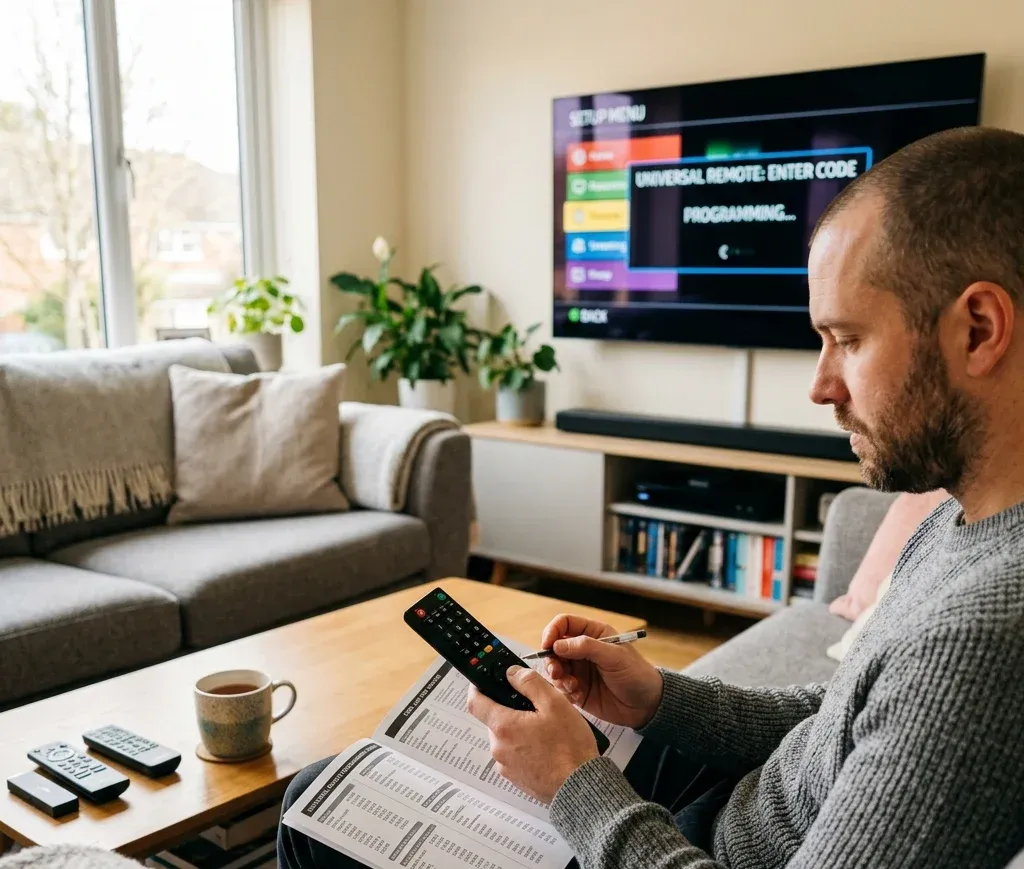
ほとんどのユニバーサルリモコンは、設定モードに入り、コードを入力し、基本操作を確認する同じ流れです。詳細はブランドごとに異なりますが、この方法はほぼ共通です。
始める前に
時間を節約するため、最初に次の3点を行います。
方法1:コードを手動入力(一覧がある場合は最速)
1. テレビの電源を入れます。
2. インジケーターが点灯したままになるまでSetupを長押しします。Setupの代わりにCode Searchを使う機種もあります。
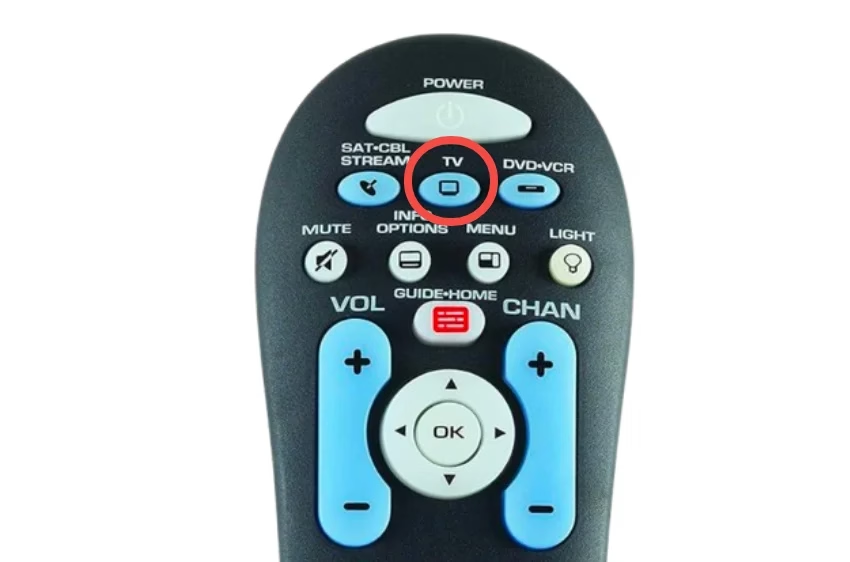
3. 機器キーのTVを押します。複合リモコンではTVを2回押す場合があります。
4. テレビブランドのコードを入力します。
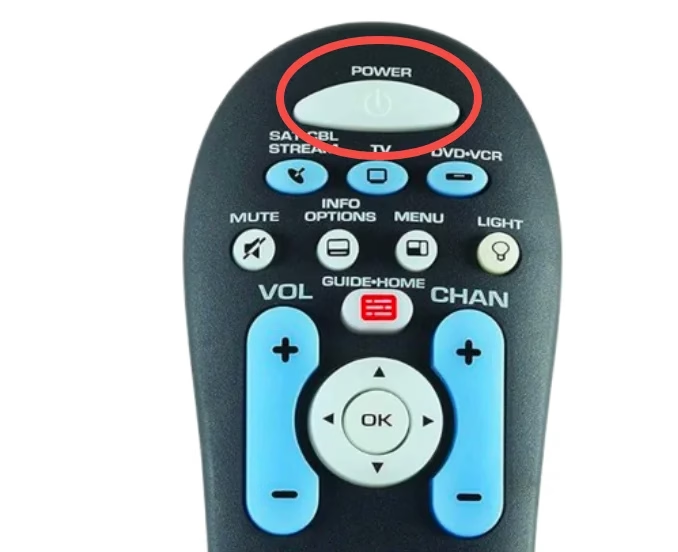
5. リモコンをテレビへ向けてPowerを押します。
1. テレビの電源が切れれば、動作するコードです。
2. 反応がなければ、次のコードで手順2~5を繰り返します。
6. OK、Enter、またはSetup(機種による)を押してコードを保存します。
7. 電源が動いたら、音量上下、Mute、InputまたはSourceを確認します。
Inputが動かなくても妥協せず、もう1コード試してください。入力切替まで確実に動くものが「最良」のコードです。
方法2:ブランドショートカットキー(対応リモコンの場合)
ブランド専用ボタン、またはブランドのコード群を選ぶ機能を備えたリモコンもあります。
1. ランプが点灯したままになるまでTVまたはSetupを長押しします。
2. ブランドキーを押すか、リモコン上のブランド一覧に従います。
3. Powerを押してテストします。
4. OKまたはSetupで保存します。
この機能があれば試す価値があり、長いコード一覧を省略できることがあります。
コードなしでユニバーサルリモコンを設定する方法
コード一覧がなくても問題ありません。コードなしでリモコンを設定するには自動検索を使います。時間はかかりますが、手動一覧が失敗した場合に有効です。
方法1:コード自動検索
1. テレビの電源を入れます。
2. インジケーターが点灯したままになるまでSetupを長押しします。
3. TVを押します。
4. 1~2秒ごとにPowerを押して放します。Powerの代わりにChannel Upを使う機種もあります。
5. テレビの電源が切れたらOKまたはEnterで保存します。
ヒント:通り過ぎてテレビが切れた後に再び点いた場合は、正しいコードを越えています。最初からやり直し、ゆっくり押してください。
方法2:手動検索(完全自動検索より高速)
テレビのコード群だけを順に送れるリモコンもあります。
1. 設定モードに入ります。
2. TVを選びます。
3. テレビが切れるまでChannel Upを長押しします。
4. 保存します。
この方法はPowerを100回押すより短時間で済むのが一般的です。


ユニバーサルリモコン設定のトラブルシューティング
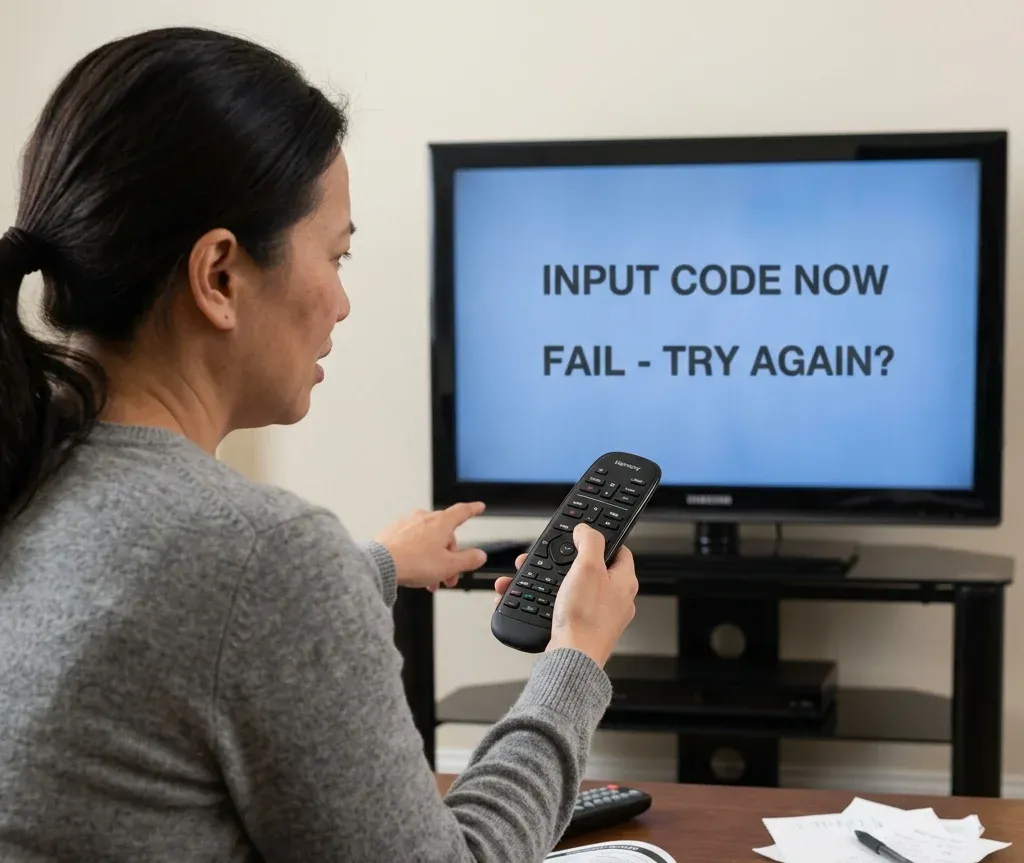
リモコンがうまく動かない場合、通常は次のいずれかが原因です。
問題:リモコンが設定モードに入らない
次を試してください。
問題:どのコードにもテレビが反応しない
考えられる原因:
対処法:
問題:電源は動くが音量または入力が動かない
最も多い「あと一歩」の状態です。
対処法:
問題:ごく近距離でしかリモコンが動かない
通常は電池または赤外線干渉が原因です。
対処法:
問題:テレビの反応が遅い、または不規則
対処法:
テレビを操作する代替方法
コードがどうしても使えなくても、スマートフォンをテレビリモコンにする簡単な代替手段があります。何十個ものコードを入力するより速い場合もあります。
スマホリモコンアプリの接続方式は主に2つです。
両方式に対応し、より多くのテレビブランドとモデルを操作できるアプリもあります。
例としてUniversal TV Remote Controlアプリは、BoostVisionが提供し、Wi-Fiと赤外線の両方に対応します。タッチパッド、画面キーボード、チャンネルショートカットも備え、メニュー移動や検索語の入力が簡単です。
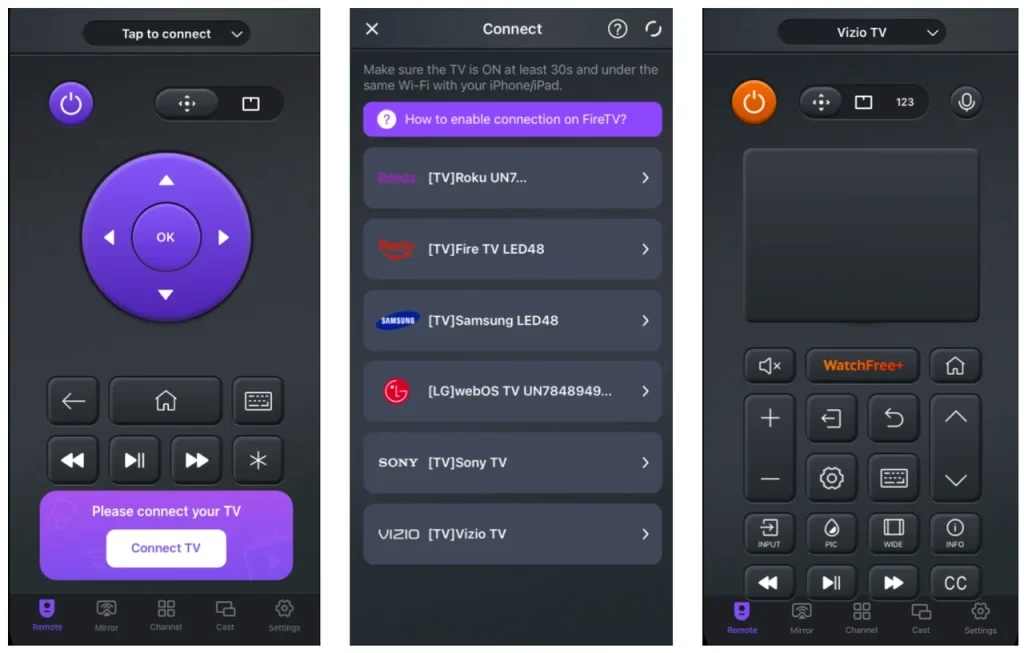
手順1. アプリストアからUniversal TV Remote Controlアプリをダウンロードし、スマートフォンへインストールします。
Android-download-button
手順2. 機器に応じて接続方法を選びます。
選択肢A:Wi-Fi接続
1. スマートフォンとテレビを同じWi-Fiネットワークに接続します。
2. リモコンアプリを開きます。
3. 一覧からテレビブランドまたは検出された機器を選びます。
4. テレビ名をタップして接続します。
通常、ペアリングは数秒で完了します。
選択肢B:IRブラスター接続
1. スマートフォンでアプリを開きます。
2. 対応一覧からテレビブランドを選びます。
3. アプリの電源ボタンをタップして接続をテストします。
4. テレビが反応したらリモコンプロファイルを保存します。
手順3. テレビの操作を始めます
接続後は、スマートフォンを通常のリモコンと同じように使えます。
できること:
物理リモコンを紛失、破損した場合や、ペアリングできない場合に特に便利です。
まとめ
ユニバーサルリモコンは魔法ではなく翻訳者です。テレビに通じるまで、いくつかの「方言」を試す必要があります。
まず電源、音量、入力を動かすのが基本です。この3つが使えれば実用上の設定は完了し、残りは追加機能です。
コードと自動検索でも解決しない場合は、スマホリモコンアプリを使うか、テレビブランド群に合うリモコンへ交換する方が速いでしょう。
ユニバーサルリモコンコードFAQ
Q:ユニバーサルリモコンのコードはどう探しますか?
リモコンの説明書または本ガイドの一覧から始めます。要求される桁数を合わせ、テレビブランド欄の先頭数個を試してください。失敗したら自動コード検索で対応信号を探します。
Q:LGテレビ用ユニバーサルリモコンのコードは何ですか?
LGに唯一の最適コードはありません。一般的な候補は0178、1004、1017、1078ですが、リモコン機種と桁数で異なります。LG欄を使い、電源、音量、入力の順でテストしてください。
Q:VizioリモコンをVizioテレビとペアリングする方法は?
Vizio純正リモコンなら、電池を入れてテレビへ向けると自動ペアリングすることがよくあります。ユニバーサルリモコンならVizioコードを入力し、入力とメニュー操作を確認してください。Vizioには動作コードが複数あります。
Q:Vizioテレビの5桁コードは何ですか?
一般的な5桁Vizioコードは11758、12757、13758、23161、31544です。リモコンが求める桁数に合うものを使ってください。
Q:コードなしでVizioテレビ用リモコンを設定する方法は?
自動コード検索を使います。設定モードでTVを選び、テレビが切れるまでPowerまたはChannel Upを繰り返し押し、OKかEnterで保存します。
Q:どのユニバーサルリモコンコードを使うべきですか?
基本操作を遅延なく扱えるコードを使います。正しいコードなら電源、音量、入力が確実に動きます。電源だけ動く場合は次を試してください。
Q:Rokuの4桁コードは何ですか?
リモコンブランドとRoku TVかどうかで異なります。よく試される4桁Roku TVコードは1756と4398です。失敗したらリモコンのRoku TV一覧または自動検索を使います。
Q:ユニバーサルリモコンはVizioテレビに対応しますか?
通常は対応します。入力とメニューまで扱えるコードを見つけるため複数候補を試す場合があります。新しいVizioテレビでは5桁コードの方が適することもあります。
Q:Vizioテレビがリモコンを認識しないのはなぜですか?
主な原因:
電池を交換し、TVモードを確認して、次のVizioコードを試します。どれも動かなければ、自動検索またはスマホリモコンアプリを代替手段として使ってください。