
Knowing how to pair Roku remote to Roku Stick is crucial, and this guide will walk you through the entire process, from understanding which remotes are compatible to dealing with issues like pairing without a Wi-Fi network. Get started.
How to Pair Roku Remote to Roku Stick?
When it comes to pairing a remote with your Roku Stick, it's important to note that the Roku Stick is designed to work with the Roku Voice Remote rather than the Roku Simple Remote. The Roku Voice Remote offers more advanced features, such as voice search, TV power control, and the ability to use private listening through headphones.
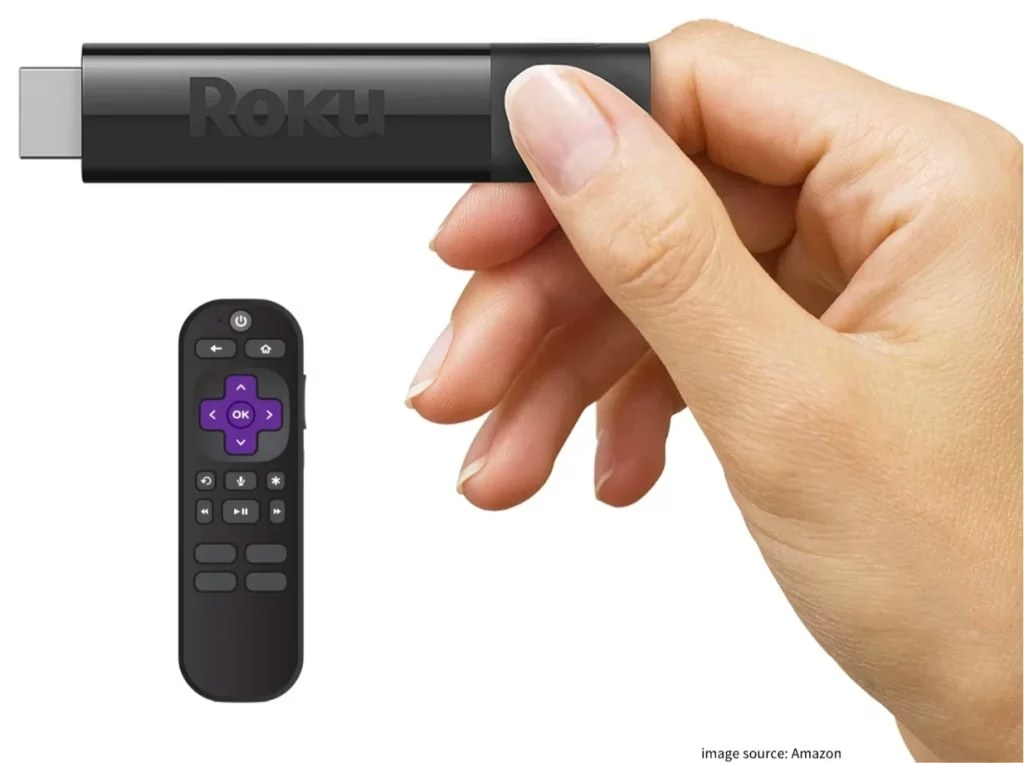
Well, how to sync Roku remote to Roku Stick? Syncing a Roku Voice remote to your Roku Stick is a simple process that can be completed in just a few steps through the Pairing button. Here's how to do it:
Step 1. Insert fresh batteries into the Roku Voice Remote properly and firmly.
Step 2. Make sure that your Roku Stick powers on.
Step 3. Press and hold the Pairing button (a small button next to the battery compartment) for a few seconds until the status light starts to flash, indicating the remote is in pairing mode.
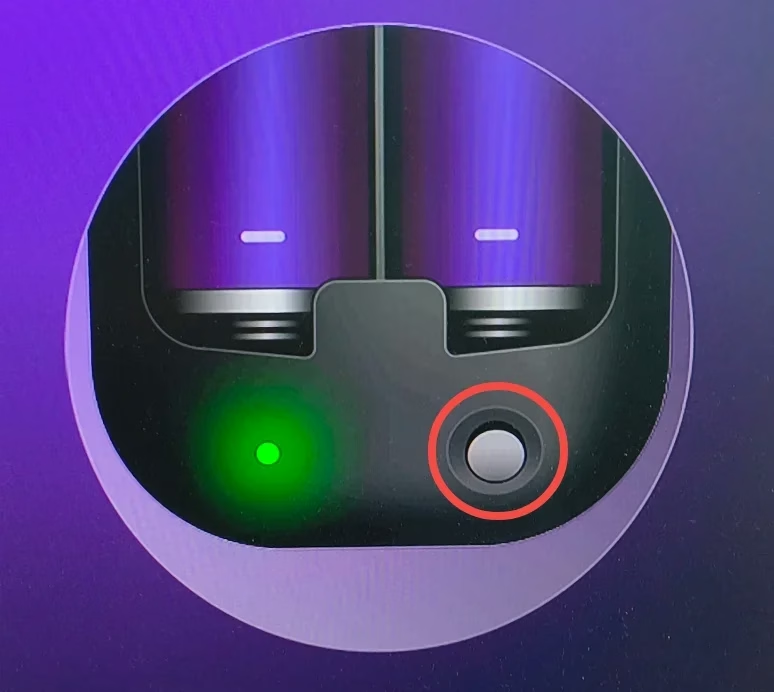
Step 4. Your Roku Stick will detect the remote and complete the pairing process. When you see a confirmation message on your TV screen, the remote has been successfully paired.
If you have a paired remote to your Roku Stick, you can complete the pairing process from the Settings menu. The steps are as follows:
Step 1. Use your paired remote to navigate to the Roku home screen and choose the Settings option.
Step 2. Go to Remotes & devices > Set up a new device > Remote > Add a new remote.
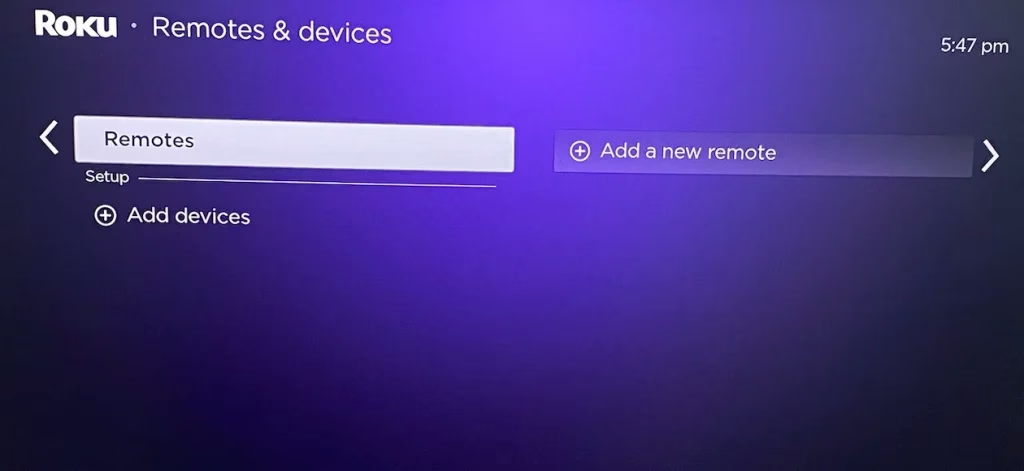
Step 3. Follow the on-screen instructions to pair another Roku remote to your Roku Stick.
Pair Roku Remote to Roku Stick Without Pairing Button
Not all Roku Voice Remotes have a pairing button. If your Roku Voice Remote doesn't have a pairing button, don't worry, there is a tutorial on how to pair Roku remote to Roku Stick without pairing button:
Step 1. Press the Home and Back buttons on the Roku remote simultaneously for about 5 seconds.
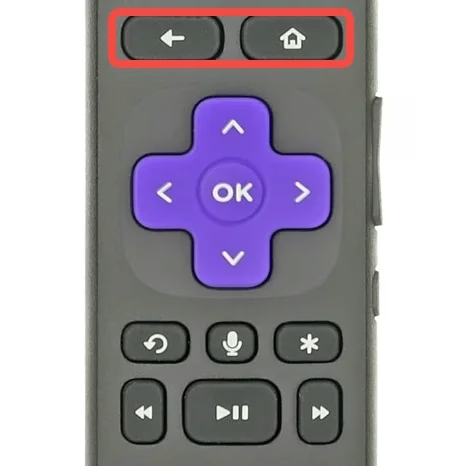
Step 2. Wait for pairing. Your Roku Stick will detect the remote and complete the pairing process automatically.
Pair Roku Remote to Roku Stick Without WiFi Network
How to connect Roku remote to Roku Stick without WiFi network? A lack of WiFi network doesn't impede the pairing process. The Roku Voice Remote pairs with the Roku Stick using a direct wireless connection, independent of your home WiFi network. In other words, Roku Voice Remote communicates directly with the Roku Stick using dedicated wireless technology, such as Bluetooth or RF connection, rather than relying on the Wi-Fi network.
While you can pair and use the remote without WiFi, there are many limitations if your Roku Stick isn't connected to WiFi network. Certain features like streaming content, voice search, and software updates will require a network connection.
How to Pair Virtual Roku Remote to Roku Stick?
In situations where you don’t have a physical Roku remote or if it’s not functioning, you can use a third-party Roku Stick remote app on your mobile device. This virtual remote can serve as an alternative, allowing you to control your Roku Stick without the need for a physical remote.
Here's how to get virtual remote control to work:
Step 1. Download the Roku Stick Remote app by clicking the button below.
Download Remote for Roku TV
Step 2. Connect the same WiFi network. For the app to work, your mobile device and Roku Stick must be connected to the same WiFi network.
Step 3. Launch the remote app on your mobile device and follow the onscreen instructions to connect to your Roku Stick.
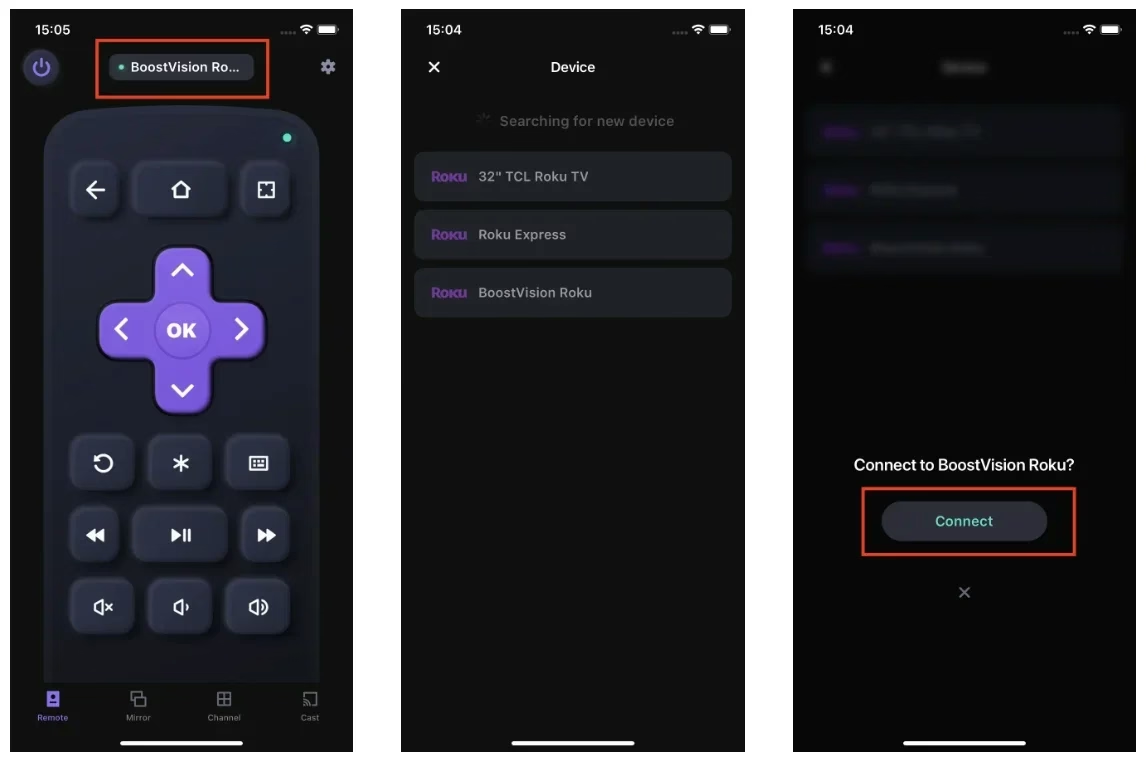
Step 4. Once paired, you can use your mobile device as a fully functional Roku Stick remote.
Conclusion
How to connect Roku remote to Roku Stick? Connecting your Roku remote to your Roku Stick doesn't have to be a daunting task. Whether you're using a voice remote with a pairing button, dealing with a remote that lacks this button, or even using a virtual remote through a smartphone app, the process is designed to be user-friendly and straightforward. Once paired, you can manipulate your Roku Stick easily.
How to Pair Roku Remote to Roku Stick FAQ
Q: Can I use any Roku remote with my Roku stick?
No, not all Roku remotes are compatible with the Roku Stick. The Roku Stick typically pairs with Roku Voice Remotes, which offer features like voice search and TV control. Roku Simple Remotes, which use infrared, are generally not compatible.
Q: How do I program my Roku remote to my stick?
To program your Roku remote to your Roku Stick, insert batteries, power on the Roku Stick, press the pairing button (or Home and Back buttons) on the remote, and follow the on-screen instructions. Alternatively, you can use the settings menu on your Roku device to pair a new remote.
Q: Why is my Roku remote not pairing?
If your Roku remote is not pairing, it could be due to several reasons: low or dead batteries, interference from other devices, or the remote being out of range. Try resetting the remote by removing and reinserting the batteries, restarting your Roku Stick, or performing the pairing process again from the settings menu.
![Roku Express vs. Stick: Which One Is Better? [Full Roundup]](/_next/image?url=https%3A%2F%2Fhelpful-fun-dead826d03.media.strapiapp.com%2Froku_express_vs_stick_banner_7c6c0c4bcb.avif&w=3840&q=80)
![How to Install Roku Streaming Stick 4K? [Quick Installation]](/_next/image?url=https%3A%2F%2Fhelpful-fun-dead826d03.media.strapiapp.com%2Fhow_to_install_roku_streaming_stick_4k_banner_7bcce94712.avif&w=3840&q=80)
