
A blinking white light does not mean the same thing on every Roku device. First locate the light: it may be on a Roku streaming player, a Roku TV, or a Roku voice remote. Then match the pattern to the correct device instructions.
Identify the light before changing anything
| Light location | What Roku documents | First action |
|---|---|---|
| Roku streaming player | A white status light can be normal and may flash when a remote button is pressed | If there is no picture, check the TV input and HDMI connection |
| Roku TV | Status-light patterns can show startup, software update, power-down or loss of network | Match the pattern in the Roku TV user guide |
| Roku voice remote | A flashing status light is used during pairing | Follow the pairing steps for the remote model |
Do not press the physical Reset button merely to stop a blinking light. Roku identifies that button as a factory-reset control.
Roku player has a white light but no picture
Roku says a white light on the player indicates that it has power. If the TV screen is blank:
1. Confirm the TV is on.
2. Select the HDMI input that matches the port used by the Roku player.
3. Reconnect the HDMI cable at both ends.
4. If possible, test another HDMI port and select that input.
5. Restart the player by disconnecting its power, waiting at least 10 seconds, and reconnecting it.
A white light by itself is not Roku's documented low-power warning. Roku documents a flashing red light for insufficient power and a solid red light for overheating.
Check the power connection
Use the power cable supplied with the Roku player. If the player is powered from a TV USB port and Roku displays a low-power warning or flashes red, connect it to a wall outlet with the supplied power adapter when available. Roku describes a wall outlet as the most reliable power source.
Do not label a white light as a power fault without the corresponding on-screen message or documented red-light state.
Understand Roku TV status-light patterns
Roku TV user guides describe patterns that are more specific than “blinking”:
If the TV is starting or updating, allow it to finish and do not disconnect power during an update. If the two-blink network pattern repeats, troubleshoot the TV's network connection. Consult the user guide for the TV model because controls and behavior can vary.
If the light is on a Roku voice remote
During remote pairing, Roku instructs users to hold the pairing button—or the Back and Home buttons on models without a pairing button—until the remote status light flashes. Follow the on-screen pairing instructions and the support steps for the exact remote.
If the remote is the only item blinking and the Roku works, do not reset the streaming player or TV.
Restart before considering a factory reset
Use a normal system restart when the device is responsive, or disconnect power for at least 10 seconds when it is not. This restart does not require the physical Reset button.
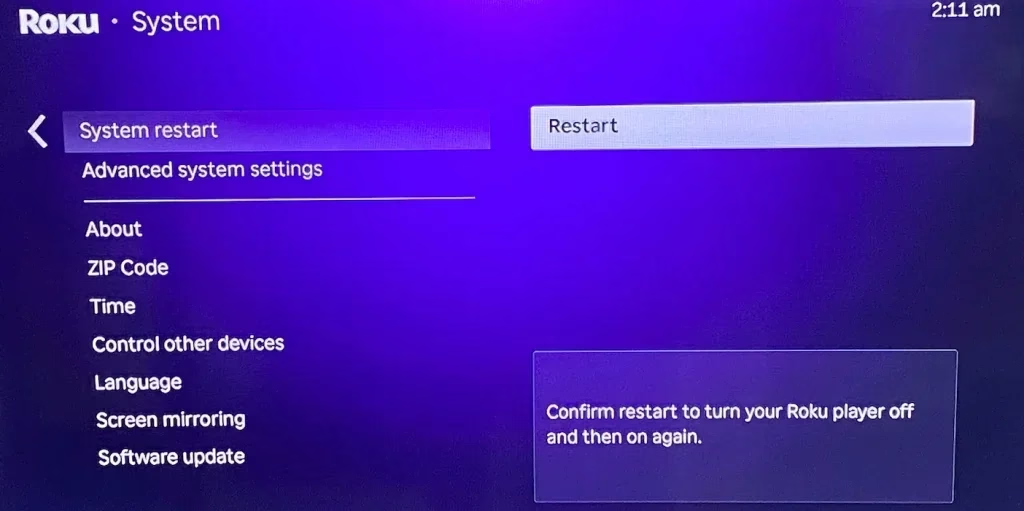
Example Roku System restart screen. Use the menu shown on the specific Roku device.
A factory reset erases personal preferences, unlinks the device from the Roku account and requires Guided Setup again. Use it only when Roku's support instructions call for it and after simpler checks fail.
Official Roku instructions
When to contact support
Contact Roku for a Roku player or Roku-branded remote that still fails after the documented power, input, HDMI, restart or pairing checks. For a Roku TV, use the TV manufacturer's support channel and provide the model number and exact light pattern.
Roku Blinking White Light FAQ
Q: Does a flashing white light on a Roku player mean low power?
No. Roku documents a flashing red light as insufficient power and a solid red light as overheating. Under normal operation, a player light can be off or white and may flash when a remote button is pressed.
Q: Does a Roku system restart erase settings?
No. Roku describes a system restart as its least invasive reset method and says it does not affect settings. Disconnecting power for at least 10 seconds performs a system restart when the menus cannot be used.
Q: What do two short blinks followed by a pause mean on a Roku TV?
Roku TV User Guide 14.5 identifies that repeating pattern as a lost network connection on a TV that was previously connected and paired with a Roku account.
Q: Does the physical Reset button erase Roku data?
Holding the physical Reset button performs a factory reset. Roku says this erases personal preferences, unlinks the device from the Roku account, removes apps and account information, and requires Guided Setup again.
 Mar 23, 2026